#102381Workspace History not in LIVE after publish
Steffen F. 11/16/23, 09:27 updated 12/02/25, 14:37

Description
The history of changes made within a workspace is correctly displayed under “History / Undo” while editing the content element.
After publishing those changes to the live version, the history inside the workspace still contains all the changes, which is expected.
However, the live version workspace does not show the history of changes made to that element after publishing to live.
Reviews 2

Related issues 1

Files 7
- Cattura-1.png 103 KB Riccardo De Contardi
- cattura-5.png 104 KB Riccardo De Contardi
- Cattura-3.png 147 KB Riccardo De Contardi
- Cattura-4.png 186 KB Riccardo De Contardi
- Cattura-2.png 118 KB Riccardo De Contardi
- Bildschirmfoto vom 2024-12-16 10-44-57.png 51 KB Philipp Kitzberger
- Bildschirmfoto vom 2024-12-16 10-48-14.png 43 KB Philipp Kitzberger


History 58
-
Riccardo De Contardi commented and changed attached Cattura-1.png attached cattura-5.png attached Cattura-4.png attached Cattura-3.png attached Cattura-2.png <span data-processor="relativetime" data-value="2024-03-03T11:29:47+00:00" > 03/03/24, 11:29 </span>
-
Philipp Kitzberger commented and changed attached Bildschirmfoto vom 2024-12-16 10-44-57.png attached Bildschirmfoto vom 2024-12-16 10-48-14.png <span data-processor="relativetime" data-value="2024-12-16T10:03:06+00:00" > 12/16/24, 10:03 </span>
I can confirm this issue for latest 11.5 and main.
Record history for live workspace (after publishing!):
{{thumbnail(Bildschirmfoto vom 2024-12-16 10-48-14.png, size=600)}}
Record history for draft workspace (after publishing!):
{{thumbnail(Bildschirmfoto vom 2024-12-16 10-44-57.png, size=600)}}
Additionally to just stage changed the following information should be rendered as well:
- details of stage change: 0 => -20
- comment (if provided)
Both information are available in the sys_history record:
MariaDB [db]> select * from sys_history ORDER BY uid DESC LIMIT 1\G
*************************** 1. row ***************************
           uid: 792
        tstamp: 1734342114
    actiontype: 6
      usertype: BE
        userid: 1
originaluserid: NULL
        recuid: 36
     tablename: tt_content
  history_data: {"current":0,"next":-20,"comment":"Now it's live!"}
     workspace: 1
correlation_id: 0400$6fdd460ee24b22c6f60683a1eee4989a
And yes: those sys_history entries should be visible on live workspace as well. Or maybe just the “stage change” one with an accumulated diff of all changes that happened to the record in draft workspace?
-
Gerrit Code Review pushed patch set 1 for main to change 89938 status
NewUnder Review <span data-processor="relativetime" data-value="2025-06-27T16:00:11+00:00" > 06/27/25, 16:00 </span> -
Gerrit Code Review pushed patch set 2 for main to change 89938 <span data-processor="relativetime" data-value="2025-07-24T16:11:56+00:00" > 07/24/25, 16:11 </span>
-
Gerrit Code Review pushed patch set 1 for 13.4 to change 90168 <span data-processor="relativetime" data-value="2025-07-26T18:50:19+00:00" > 07/26/25, 18:50 </span>
-
Benni Mack commented and changed status
Under ReviewResolved done0 %100 % <span data-processor="relativetime" data-value="2025-07-26T18:55:11+00:00" > 07/26/25, 18:55 </span>Applied in changeset commit:5c7532275b8a33c844292479c9b943c17897d93b.
-
Benni Mack changed status
ResolvedClosed <span data-processor="relativetime" data-value="2025-12-02T14:37:05+00:00" > 12/02/25, 14:37 </span> -
Benni Mack changed Related to #108954 <span data-processor="relativetime" data-value="2026-02-12T14:16:01+00:00" > 02/12/26, 14:16 </span>


if you provide a step-by-step procedure on
1. what you did
2. wha the expected results would be
that would be of a great help.
I just performed the following test on version 13.1.0-dev (latest main)
1. Create a page “Test 102381 TEST“
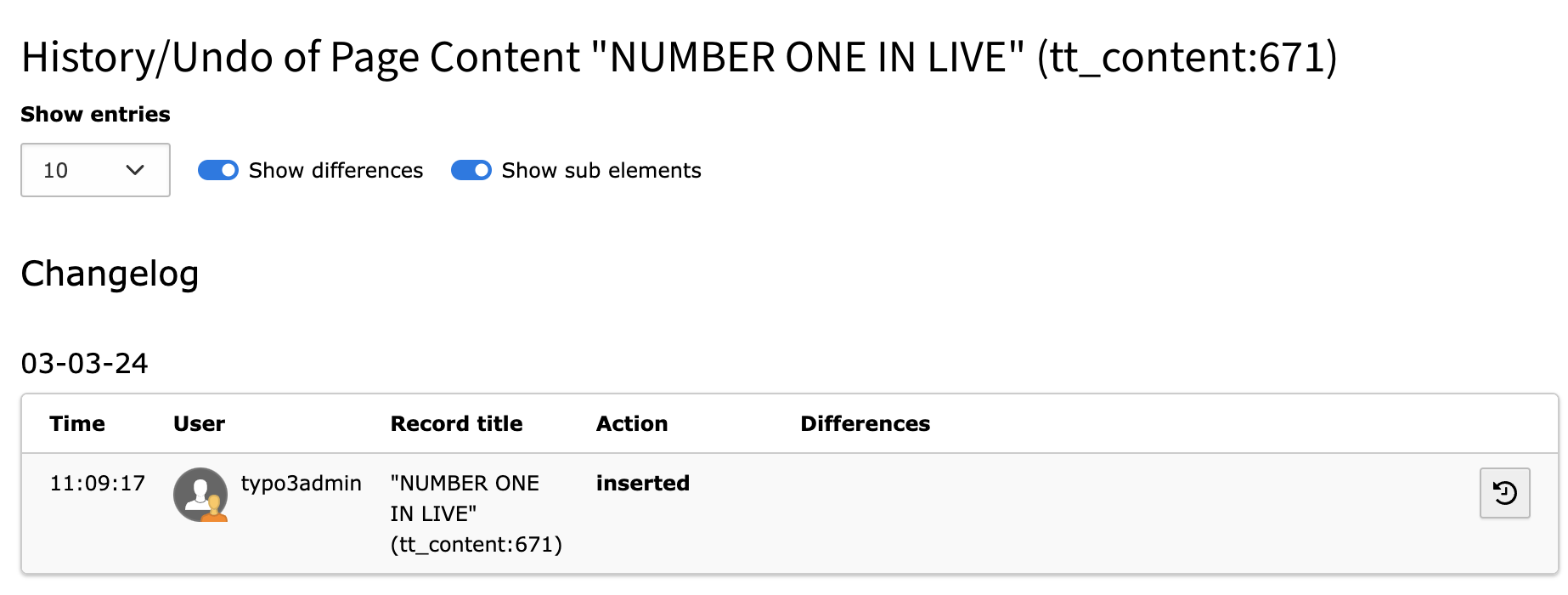
2. LIVE workspace: create a CE CType: “Header Only”; Header “NUMBER ONE IN LIVE“
3. Go to the page “Test 102381 TEST” > list wiew > click on the kebab icon of the CE “NUMBER ONE IN LIVE” > History/Undo shows:
Cattura-1.png
4. switch to the DRAFT workspace, the CE has the same Header
5. in DRAFT WORSKPACE Go to the page “Test 102381 TEST” > list wiew > click on the kebab icon of the CE “NUMBER ONE IN LIVE” > History/Undo shows
the same content as [Cattura-1.png]
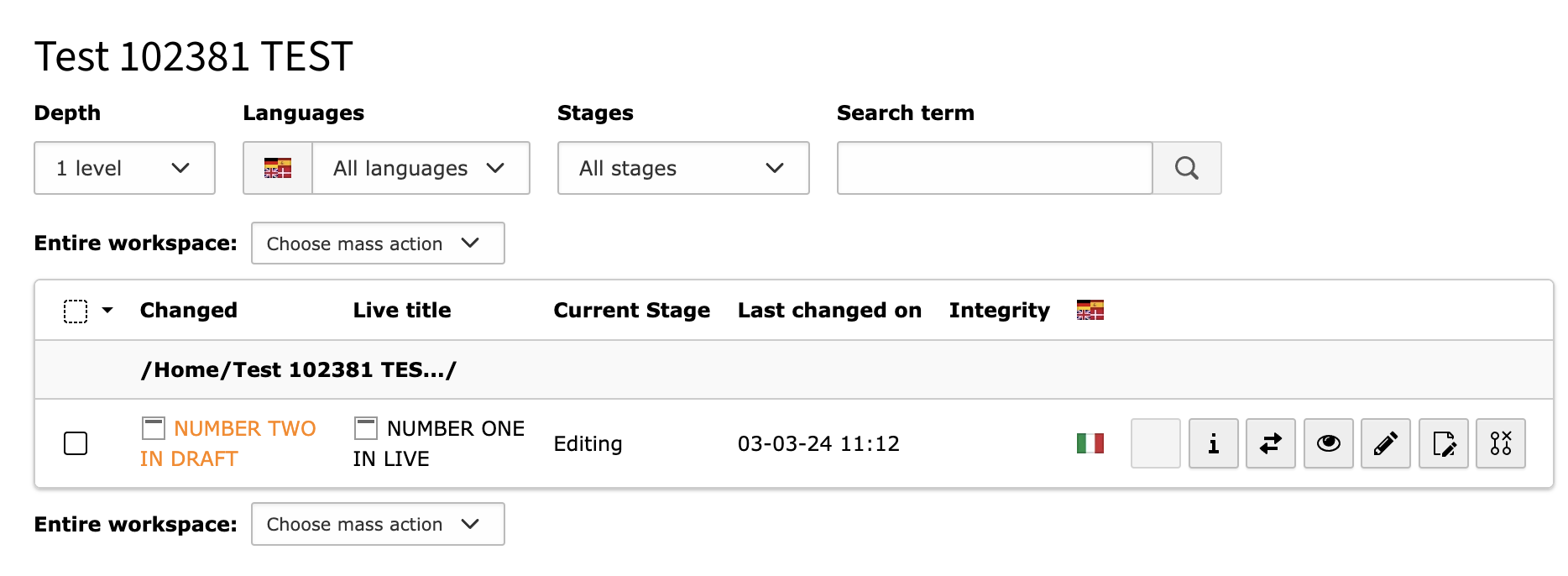
6. Edit the element in DRAFT workspace and change the header to “NUMBER TWO IN DRAFT”, save
The workspaces module shows:
Cattura-2.png
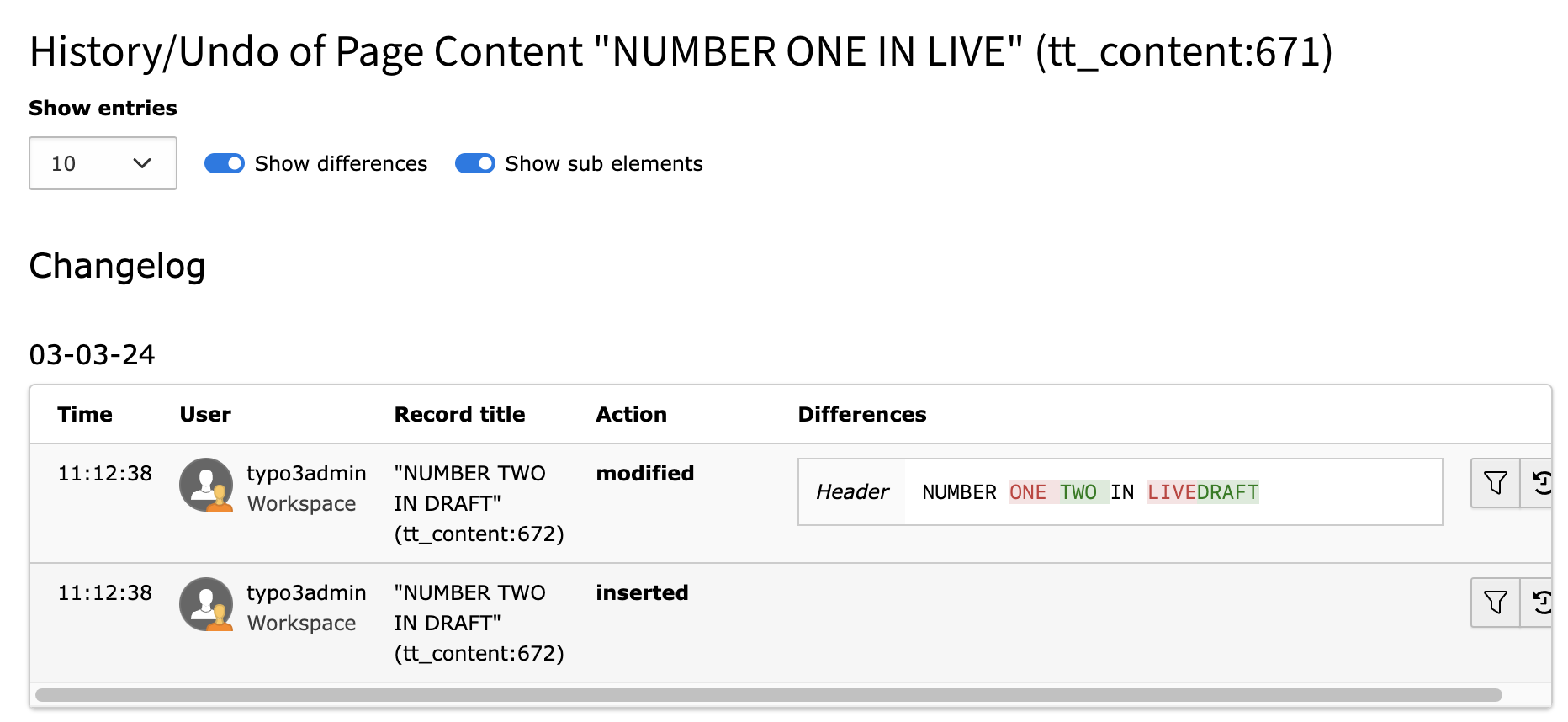
7. Go to the page “Test 102381 TEST” > list wiew > click on the kebab icon of the CE “NUMBER TWO IN DRAFT” > History/Undo shows:
Cattura-3.png
There is a source of confusion for the editor: now the first item on the history says that _*“NUMBER TWO IN DRAFT“_ has been inserted!
That’s because I edited the headline and the column “Record Title” on this table *shows just the current title and not its history…
8. workspaces module > select the element and choose on the dropdown “Choose staging action”: “Publish to LIVE”; now the workspaces module shows no differences (“No records Found”)
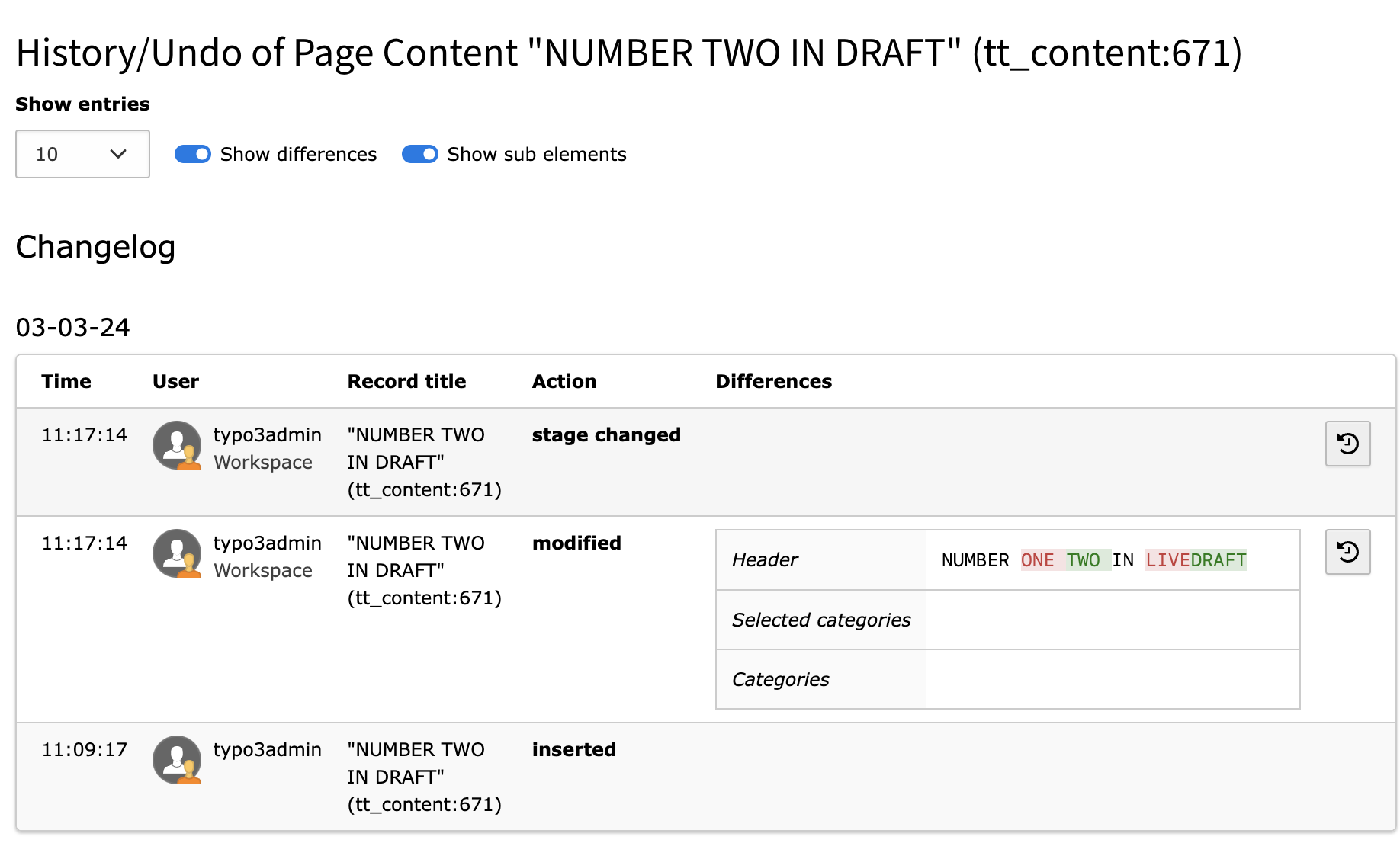
9. Go again to the page “Test 102381 TEST” > list wiew > click on the kebab icon of the CE “NUMBER TWO IN DRAFT” > History/Undo shows:
Cattura-4.png
8. go to LIVE workspace
9. Go to the page “Test 102381 TEST” > list wiew
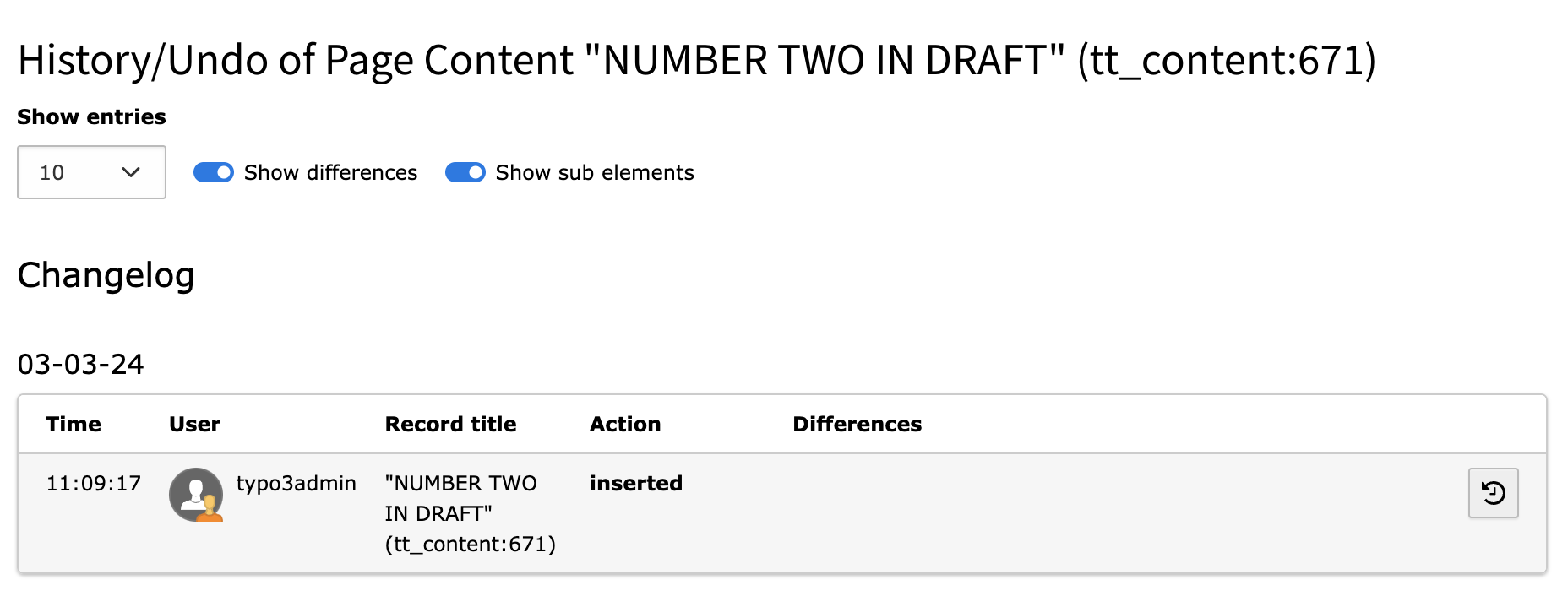
- the CE now has headline “NUMBER TWO IN DRAFT” (OK)
- list wiew > click on the kebab icon of the CE “NUMBER TWO IN DRAFT” > History/Undo shows:
Cattura-5.png
Again, it is confusing… the history starts again with “NUMBER TWO IN DRAFT” (inserted)
I feel that this issue could be more vast and about what the behavior history/undo module should be; I think that it would be nice to collect some use cases sooner or later (like the one I just wrote).