#58627Upload of files does not work in Google Chrome 34
Patrick Lobacher 05/08/14, 12:03 updated 12/14/14, 18:12

Description
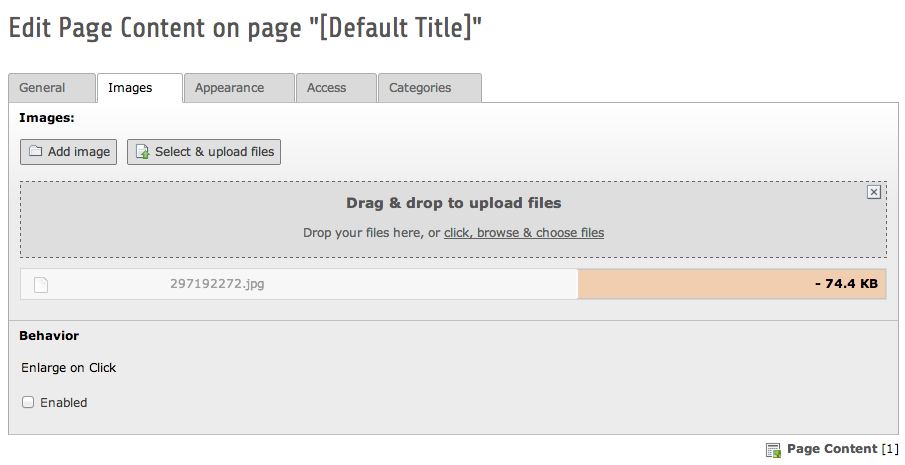
Uploading of files (either drag & drop or upload action) does not work in Chrome 34, while it works with other browsers (FF, Safari)
TYPO3: 6.2.2
OS: Mac OS X 10.9.2
Browser: Google Chrome 34.0.1847.131
Error: System asks for “Shall existing files be overwritten” and after confirming the progressbar stays light-red with the name on the left and the filesize on the right side.
Reviews 0
No change resolves or names this issue in its commit message, and no comment links one.
Files 1
History 4
-
Frans Saris commented and changed status
NewNeeds Feedback 05/08/14, 16:59 -
Markus Klein commented and changed target version 05/08/14, 18:36
Can’t reproduce this either.
Tested on Win7 with Chrome “34.0.1847.131 m“
No update to 132 available -
Alexander Opitz commented 09/11/14, 16:22
Hi,
does the problem still exists within newer versions of Chrome?
-
Alexander Opitz commented and changed status
Needs FeedbackClosed 12/14/14, 18:12No feedback within the last 90 days => closing this issue.
If you think that this is the wrong decision or experience this issue again, then please write to the mailing list typo3.teams.bugs with issue number and an explanation or open a new ticket and add a relation to this ticket number.


Just tested in Chrome 34.0.1847.132 on Ubuntu 12.10 and here upload works just as aspected.
Could you check if you can update to 34.0.1847.132 and test again?
And could you check the network tab in your console to see if there is some response from the server?