#74130Workspace change detail window didn't show the workspace version
Tobias Klepp 03/04/16, 11:28 updated 03/23/25, 21:57

Description
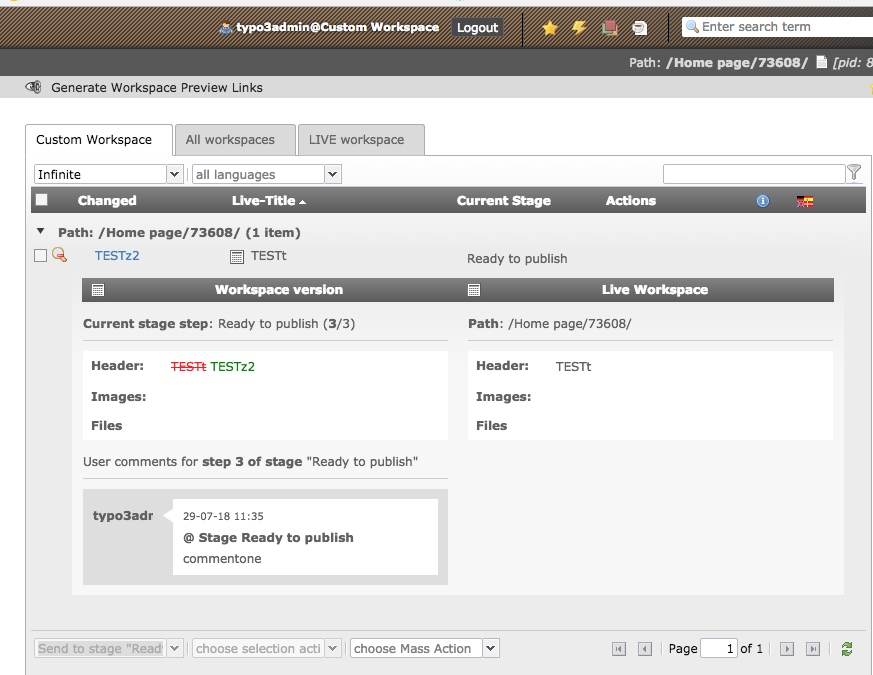
If you open in the workspace module your list of changes, you can open the workspace change detail window for a specific page or content element by clicking on the magnifying glass icon. This windows didn’t show the workspace version in the workspace version column. On both columns you see the same live version. Differences between live and workspace version can not be detected.
Reviews 0
No change resolves or names this issue in its commit message, and no comment links one.
Files 5



History 6
-
Riccardo De Contardi changed category <span data-processor="relativetime" data-value="2016-05-05T17:58:17+00:00" > 05/05/16, 17:58 </span>
-
Riccardo De Contardi commented and changed attached typo3-6.2.png attached typo3-7.6.png attached typo3-8.7.png attached typo3-9.4.png status
NewNeeds Feedback <span data-processor="relativetime" data-value="2018-07-29T11:54:30+00:00" > 07/29/18, 11:54 </span> -
Tobias Klepp commented <span data-processor="relativetime" data-value="2018-07-30T08:55:43+00:00" > 07/30/18, 08:55 </span>
Thank you for testing this issue. I test it again and I have completely different results linke you. It is still exactly the same issue I described in the bug. The data of the version is okay. If I click on the preview link to open the versions in the frontend to compare, everything is fine and correct. But in the backend I see completely no diff in the workspaces module.
Maybe it is a Windows issue. I use Windows 10 with PHP 5.5.38 as FastCGI and Apache 2.4.
-
Riccardo De Contardi changed status
Needs FeedbackNew <span data-processor="relativetime" data-value="2018-07-30T10:31:27+00:00" > 07/30/18, 10:31 </span> -
Benni Mack commented and changed status
NewNeeds Feedback <span data-processor="relativetime" data-value="2024-06-14T20:28:12+00:00" > 06/14/24, 20:28 </span>Hey, we’ve made huge improvements to workspaces in v11 + v12. Can you recheck this? I can’t reproduce this (or I don’t really understand the issue)
-
Benni Mack commented and changed status
Needs FeedbackClosed <span data-processor="relativetime" data-value="2025-03-23T21:57:44+00:00" > 03/23/25, 21:57 </span>Closing this issue due to lack of feedback after 90 days. If you feel this is the wrong decision, let me know, so I will re-open the issue.


Hello and sorry for the late update about this issue.
I’ve repeated the same test for 6.2, 7.6, 8.7 and 9.4-dev (latest master):
Prerequisites
- a custom workspace
- a page created in LIVE workspace with a content element created in LIVE workspace
Test procedure
- switch to custom workspace
- modify the content element (e.g. the headline)
- go to workspace module
- select the modified element
- choose “send to stage: ready to publish“
- add a comment and press “OK”
Results for 6.2
See attached screenshot: it seems that the change is visible
typo3-6.2.png
Results for 7.6
See attached screenshot: it seems that the change is visible
typo3-7.6.png
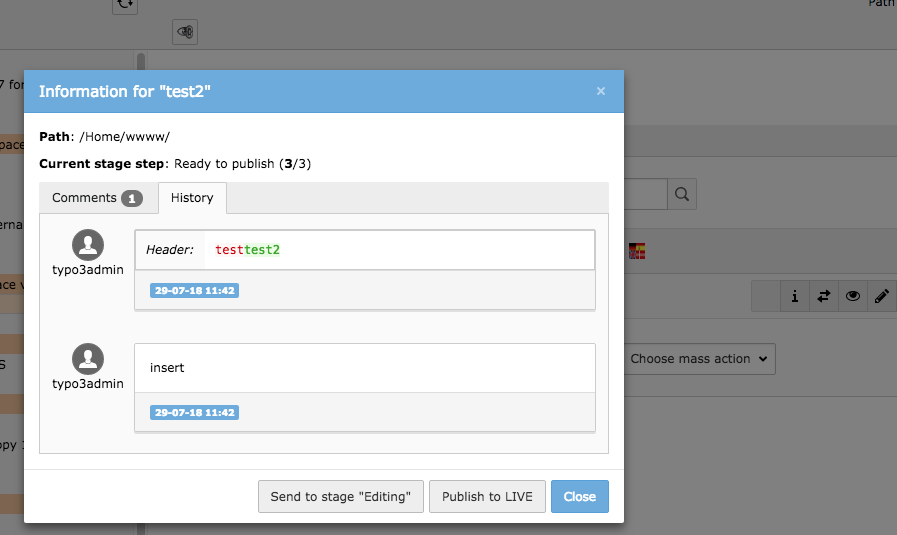
Results for 8.7
The “Magnifying glass” icon has been removed; you can click on the “i” (info) icon to show a popup with the information about the changes; they are in the “history” tab of the popup – see attached screenshot
typo3-8.7.png
Results for 9.4-dev
The “Magnifying glass” icon has been removed; you can click on the “i” (info) icon to show a popup with the information about the changes; there is also a “summary of changes” tab
typo3-9.4.png
Is it sufficient to consider this issue solved or is there a different test that should be performed? Thank you very much.