#78610Allow record localization from non default language in the list module
Anonymous 11/08/16, 16:19 updated 09/18/26, 13:35

Description
Would be great to have the posibility to localize records, from a non default language.
However this is possible in Page module using Localization Wizard, but it is missing in List module.
note: have 3 languages. English(default), German, Dansk
For now in List module we have this

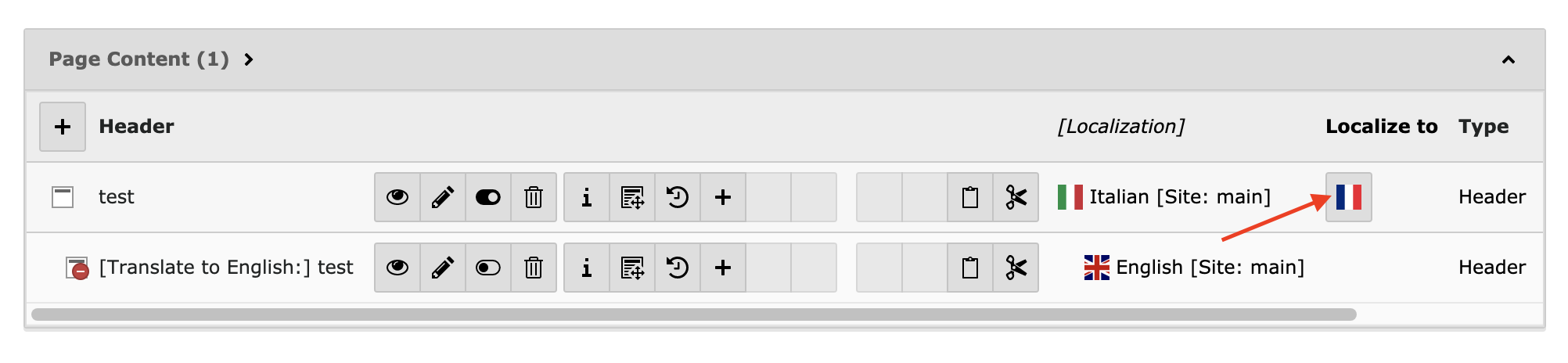
But would be great to have this

As I saw the buttons are just links, that have a format like this
typo3/index.php?route=/record/commit // route to Controller\SimpleDataHandlerController::mainAction
&token=f10a3d706e355ed40a13ba7dd4c53c882c027f1e // token
&prErr=1 // some error code
&uPT=1 // some other unique id
&vC=2471f0028b // some generated code
&cmd[tt_content][168][localize]=1 // DataHandler takes care to localize record 168 to language with uid 1
&redirect=/typo3/index.php?M=web_list // all this till the end of block takes care to redirect to new localized record
    &moduleToken=461c16a8e1be600907e758dffe6b9dee489ce80d
    &id=1
    &imagemode=1 // still don't know for what is this ))
    &justLocalized=tt_content:168:1  // redirects to just localized to uid 1 of record 168
And I manipulated that URL a little bit to localize a record that was created in a non default language
When clicking manipulated link I have two behaviours.
*TYPO3 v7.6.12*
Record is “fake localized”, I am redirected to list module, but localized record does not have anything in common with his parent record.
Parent was just used to take data from, and is just listed as another record with language uid that was requested.

*TYPO3 v7.6.11*
The record was localized for real, I was redirected to it.
The readonly fields (TCA l10n_display) of each input that showed parent value was right.
The only issues I encountered was that
*Transl.Orig* select field showed records from default language, not from what I localized
I could save the record, but when I went back to list module, just localized record was not visible.
I looked in database and everything was fine, sys_language_uid, l18_parent, l18_diffsource (should be l10n, kept l18n for backward compatibility)
As a general idea. Transl.Orig is showed right, and localized record is not visible in list module (with v7.6.11)
Reviews 0
No change resolves or names this issue in its commit message, and no comment links one.
Related issues 2


Files 2

History 7
-
Tymoteusz Motylewski changed subject
Allow record localization from non default languageAllow record localization from non default language in the list module <span data-processor="relativetime" data-value="2016-11-08T16:46:31+00:00" > 11/08/16, 16:46 </span> -
Anonymous commented <span data-processor="relativetime" data-value="2016-11-10T09:15:08+00:00" > 11/10/16, 09:15 </span>
Also in pages module you cannot localize, when you create a new content element in non default language.
Localizing from non default language to default language, also would be an option.
-
Riccardo De Contardi commented and changed attached cattura.png <span data-processor="relativetime" data-value="2020-03-18T22:41:24+00:00" > 03/18/20, 22:41 </span>
Images are now missing, so it is difficult to say if this issue is still true; I guess it is so (10.4.0-dev); I followed these steps
1) Create a page in three different languages (Italian (Default), English (ID=1), French (ID=2)
2) Create a content element in italian and translate it in English (Translate mode)Results
1) if you are in Page > languages mode and click on “Translate” button, it pops up the translation wizard and lets you decide if you want to take as starting point the original (italian) element or the english element
2) If you are on List view, the only “translate” button available in the one in the default language; no wizard pops out. -
Daniel Windloff changed Related to #82206 <span data-processor="relativetime" data-value="2020-08-23T06:17:35+00:00" > 08/23/20, 06:17 </span>
-
leon jänicke changed Related to #101564 <span data-processor="relativetime" data-value="2023-08-03T21:07:09+00:00" > 08/03/23, 21:07 </span>
-
Georg Ringer commented and changed attached Bildschirmfoto 2026-09-18 um 15.34.31.png status
NewClosed <span data-processor="relativetime" data-value="2026-09-18T13:35:13+00:00" > 09/18/26, 13:35 </span>checked in v15 which is same for v14. the record module uses the wizard as well, see screenshot
Bildschirmfoto%202026-09-18%20um%2015.34.31.png
therefore closing the issue


Have to mention that with v7.6.12 didn’t look into database to see if related fields are right.
But as developers said, with this patch
https://review.typo3.org/#/c/50022/
Now record is localized in a right way, but is still not showed in list module, and Transl.Origin is still showing default language records.