#87625MetaTagApi gives an Error in the Frontend when "og:image" is a stdWrap Value in TypoScript
Julian Mair 02/02/19, 14:43 updated 06/26/24, 20:03

Description
I have a problem with the MetaTag Api.
When I have in my TypoScript `og:image` lines, then i got this error in the frontend:
#1524209729 UnexpectedValueException: This MetaTagManager can't handle property "og:image:type"
During my research i found out that the problem lies inside the `stdWrap` part of the `og:image` config (see below; the cObject Node).
When i remove the whole `cObject` Node and add something static like `og:image = /image.jpeg`, then it will work perfectly.
og:image {
    attribute = property
    cObject = FILES
    cObject {
        maxItems = 1
        references {
            table = pages
            uid.data = page:uid
            fieldName = media
        }
        # image from media field
        renderObj = TEXT
        renderObj {
            data = file:current:publicUrl
        }
        # fallback image if no media field was set
        stdWrap.ifEmpty.fallback = TEXT
        stdWrap.ifEmpty.fallback.value = /fallback.jpeg
    }
}
og:image:type = image/jpeg
og:image:type.attribute = property
og:image:width = 1280
og:image:width.attribute = property
og:image:height = 720
og:image:height.attribute = property
Side Note: this snippet worked perfectly in v8.7.*
Reviews 0
No change resolves or names this issue in its commit message, and no comment links one.
Related issues 1

Files 2

History 12
-
Richard Haeser changed status
NewAccepted assigned to Richard Haeser priorityShould haveMust have 02/02/19, 21:31 -
Richard Haeser commented and changed status
AcceptedNeeds Feedback 02/02/19, 22:35 -
Julian Mair commented 02/03/19, 10:54
Yeah, you’re right, my snippet doesn’t work! :)
Initialy, this snippet was a bit larger and more complicated (the fallback part was some kind of a FLUIDTEMPLATE) so i changed it on the fly without controlling it if is actually working.But, nevertheless, even with your corrected config it doesn’t work either… i still get the error message.
Could it be that ddev (local development env) cause the problem? ATM, i have no possibility to test the project on a real server…
-
Richard Haeser commented 02/03/19, 12:06
I’m working on a ddev setup myself as well. The problem is that the og:image:type can not be set, before an og:image is set. If the og:image is failing, it will result in the message that it can’t handle the og:image:type. Maybe you can try this in another installation?
-
Julian Mair commented and changed attached diff.png 02/03/19, 15:19
Yep, true – I came to the same result while debugging.
I tried to make a new instance with a plain ts template with only the `og:image` tags … but same result.
But i encountered a strange behavior while debugging:
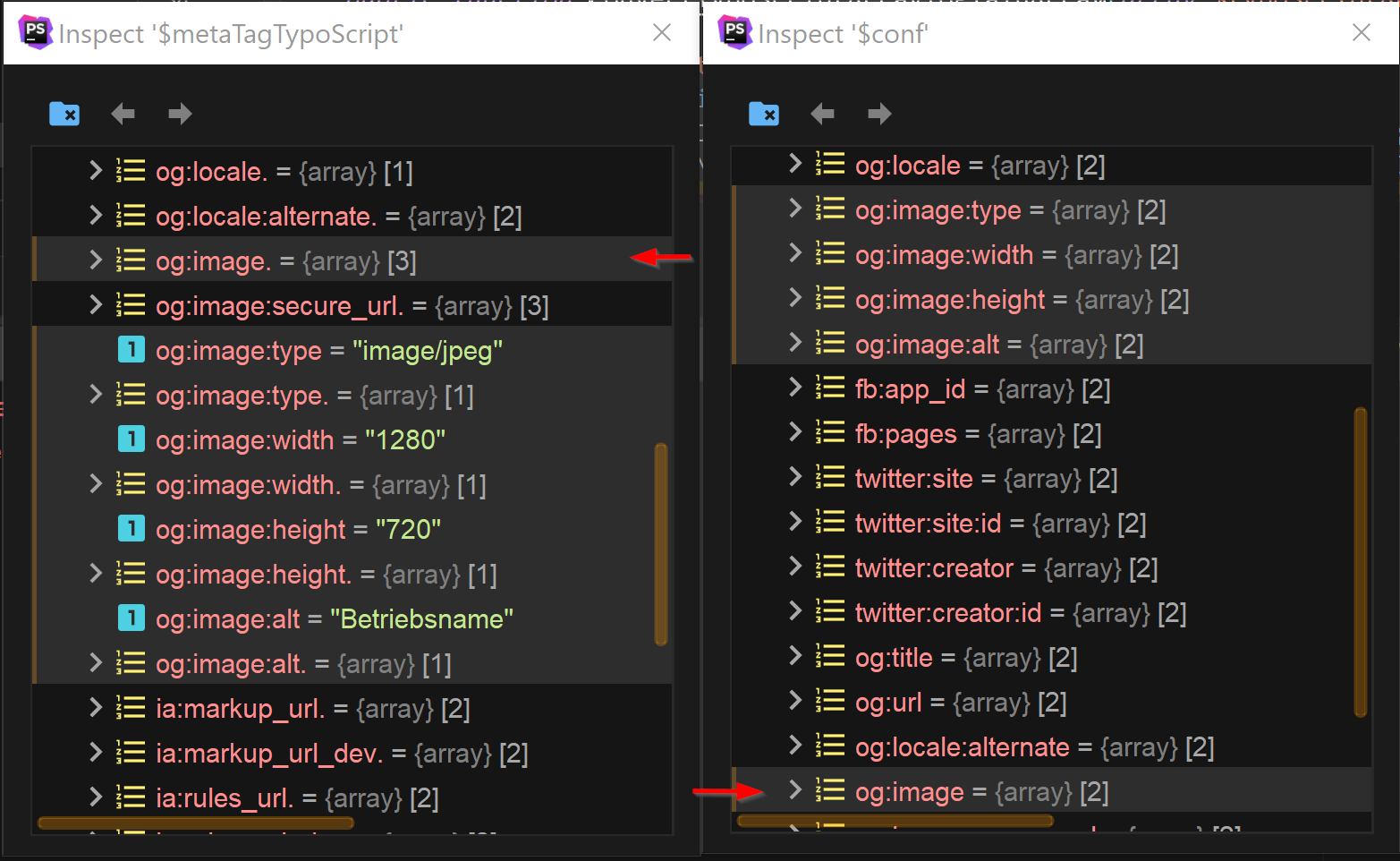
On line `1037` in `\TYPO3\CMS\Core\TypoScript\TypoScriptService`, the function ‘convertTypoScriptArrayToPlainArray’ rearrange the order of the array items, which – I think – cause this mess (see screenshot).Could this be the problem? Does this happen also in your instance, or just in mine?
-
Julian Mair commented 03/17/19, 11:28
After I xdebugged the hell out of this, I’m pretty sure that the ordering of the array is completely messed up (see screenshot above), after the ‘convertTypoScriptArrayToPlainArray’ function call…
Is this even fixable at all? Or can I go around this error by adjusting my config? Does nobody have ever had such a problem?
I don’t know how to continue…
-
Richard Haeser changed status
Needs FeedbackNew 04/12/19, 20:49 -
David Menzel commented and changed attached meta_og_image_error.JPG 02/20/20, 15:16
I have the same problem.
I wanted to create some og:image tags
page {
    ##### Meta
    meta {
        og:image = /logo.jpg
        og:image:type = image/jpeg
        og:image:type.attribute = property
        og:image:width = 1200
        og:image:width.attribute = property
        og:image:height = 630
        og:image:height.attribute = property
        og:image:alt = Titel
        og:image:alt.attribute = property
    }
}
but when I want to remove them with
page.meta.og:image >
page.meta.og:image.type >
page.meta.og:image.width >
page.meta.og:image.height >
page.meta.og:image.alt >
I get the following error:
(1/1) #1524209729 UnexpectedValueException

This MetaTagManager can't handle property "og:image:type"
Creating the tags works, but it seems like that I can’t use og:image:type, *:height and the other attributes when I want to remove them later.
-
Kurt Dirnbauer commented 01/20/22, 13:32
in TYPO3 10.4.23 I am using siteconfig (config.yaml) to set the og-image (a few sites in a TYPO3-Install):
Error, i get a correct output for og:image if I remove og:image:width.
(1/1) #1524209729 UnexpectedValueException
This MetaTagManager can't handle property "og:image:width"
maybe “data” is a problem? again, without og:image:width I get a correct og-image-tag in frontend.
Error:
page {
    meta {
        og:site_name.data = site:theme.brand.name.de
        og:site_name.attribute = property

        og:locale = de_DE
        og:locale.attribute = property

        og:image.data = site:theme.brand.ogimage

        og:image.attribute = property

        og:image:width = 1200
        og:image:width.attribute = property

...
this works (correct image:width in Frontend)
page {
    meta {
        og:site_name.data = site:theme.brand.name.de
        og:site_name.attribute = property

        og:locale = de_DE
        og:locale.attribute = property

        og:image = https://www.example.com/typo3conf/ext/theme/Resources/Public/Images/og_radon.png

        og:image.attribute = property

        og:image:width = 1200
        og:image:width.attribute = property
...
this works too, just removed with comments, but of course no image-width tag in frontend.
page { meta { og:site_name.data = site:theme.brand.name.de og:site_name.attribute = property og:locale = de_DE og:locale.attribute = property og:image.data = site:theme.brand.ogimage og:image.attribute = property // og:image:width = 1200 // og:image:width.attribute = property ... -
Felix Nagel commented 01/24/22, 20:38
This works without issues in TYPO3 10.4.23
og:image.stdWrap.cObject = TEXT
og:image.stdWrap.cObject {
    if.isFalse.field = og_image
    stdWrap.typolink {
        parameter.stdWrap.cObject = IMG_RESOURCE
        parameter.stdWrap.cObject.file = {$config.social.image}
        returnLast = url
        forceAbsoluteUrl = 1
    }
}
where {$config.social.image} is
EXT:my_package/Resources/Public/Icons/someIcon.png
-
Georg Ringer commented and changed status
NewClosed 06/26/24, 20:03I couldn’t reproduce this in latest version, therefore closing the issue.
if you don’t agree, feel free to contact me via slack!
-
Riccardo De Contardi changed Related to #93383 07/21/24, 14:46


Hi,
I checked the code in CMS8 and 9. And the submitted code is not working in CMS8 either. The issue is within the fallback part.
It should be:
With this code it works in CMS8 and 9.
Can you check and confirm?