#91593Improved error msg if checkbox "Editable for Admins Only " set
Georg Ringer 06/05/20, 09:24 updated 05/22/26, 07:49

Description
If checkbox “Editable for Admins Only” is set on a page, the records inside can be opened by an editor and there is the save btn but it will lead to an error “…without permission. Or non-existing page.”
ideas:
- drop save button
- add flash message in sys folder + single record to inform user
- change all fields to readonly just like it would be for ctrl>readOnly = 1
Reviews 0
No change resolves or names this issue in its commit message, and no comment links one.
Fix this issue
Start the commit message of your patch with this. Add what the patch does, and the versions it goes to in "Releases:". How to create a patch
- Commit message
-
[BUGFIX] Improved error msg if checkbox "Editable for Admins Only " set

Resolves: #91593
Releases: main
Related issues 1

Files 5
History 7
-
Riccardo De Contardi changed category parent task #93528 <span data-processor="relativetime" data-value="2021-08-08T08:46:53+00:00" > 08/08/21, 08:46 </span>
-
Andreas Kienast commented and changed status
AcceptedNeeds Feedback <span data-processor="relativetime" data-value="2022-04-04T16:51:35+00:00" > 04/04/22, 16:51 </span> -
Andreas Kienast changed Related to #97296 <span data-processor="relativetime" data-value="2022-04-04T16:55:49+00:00" > 04/04/22, 16:55 </span>
-
Riccardo De Contardi commented and changed attached cattura01.png attached cattura02.png attached cattura03.png attached cattura04.png attached cattura05.png <span data-processor="relativetime" data-value="2022-04-16T15:44:25+00:00" > 04/16/22, 15:44 </span>
IMHO if you let your user do something and then tell him “Error, you shouldn’t have done that” it’s kinda punishing him for actions for which he is not guilty, and this must be avoided.
I update the issue with my findings (TYPO3 12.0.0-dev (latest master)
Prerequisites
As “admin” user:
1) create an “Editors” group and an “Editor” user belonging to the group
2) give “Editors” full control over page and content fields (Access List)
3) Create a page “TEST”, and set “Editors” as group; grant full control
4) Go to “TEST” > edit > tab “Access” > “Restrict Editing by non-admins”: set to 1 (YES)Test procedure
1) Switch to “Editor” or log out and log in as “Editor“
2) Go to the page “TEST”Results on “Page” Module
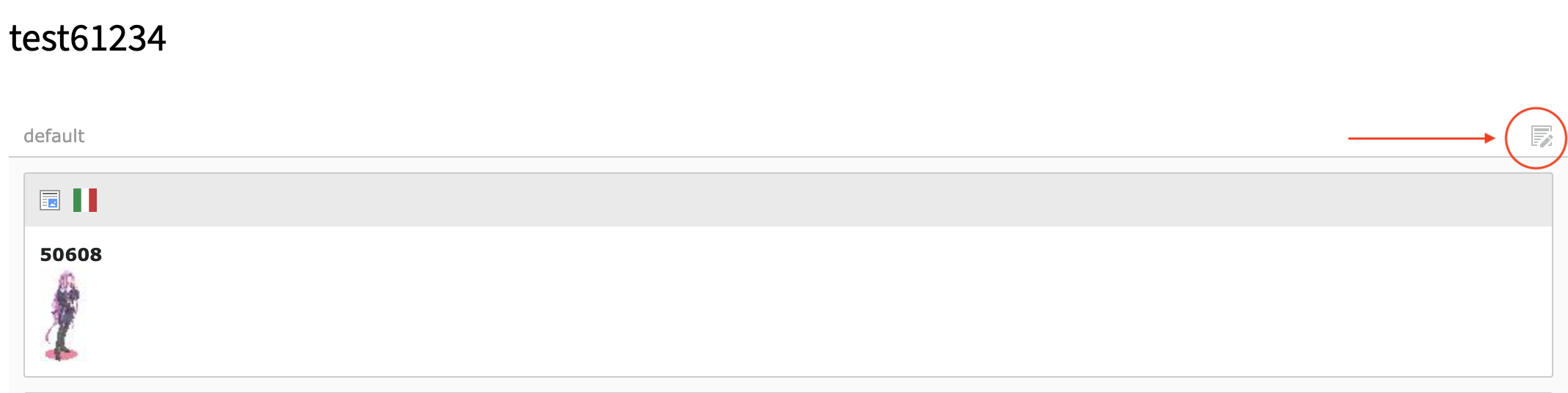
It seems that all the edit (pencil) Icon are absent; but it still possible to edit all the content elements on the page using the icon shown on Cattura01.png:
As result, the editor obtains an error for each content record like:
1: Attempt to modify record '50608' (tt_content:559) without permission. Or non-existing page.
Suggestion: remove the icon on “admin-only” pages
Results on “List” Module
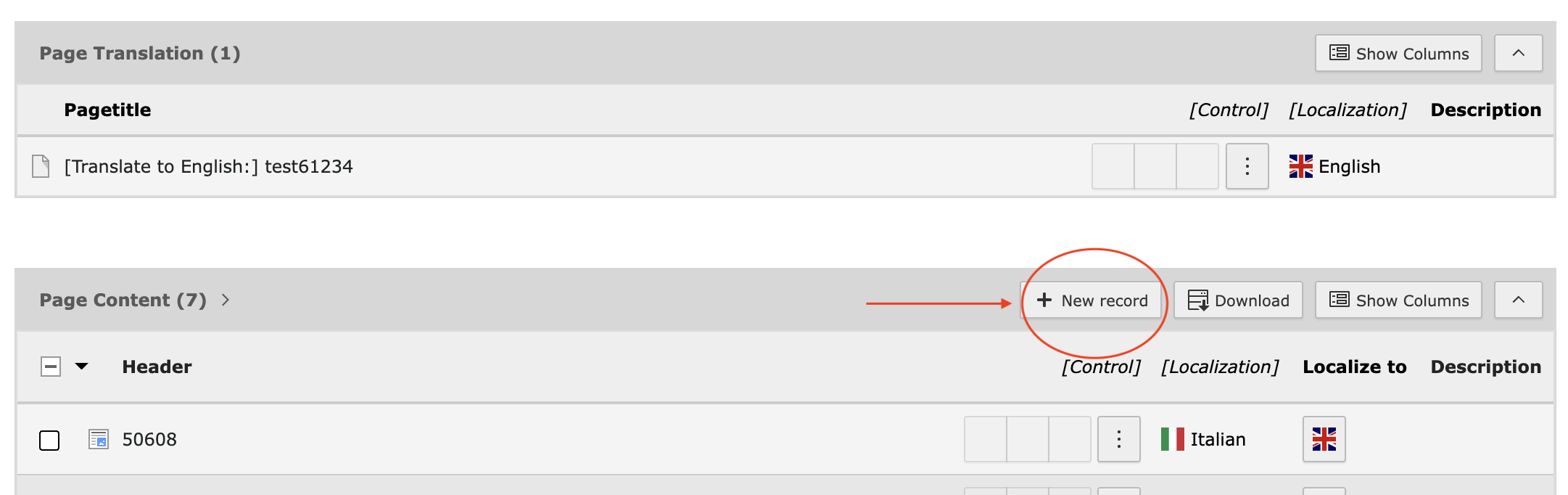
It seems that all the edit (pencil) Icon are absent; but it still possible to add a new content elements using the button shown on Cattura02.png:
As result, the editor obtains an error when trying to save the content like:
1: Attempt to insert a record on page 'test61234' (422) from table 'tt_content' without permissions. Or non-existing page.
and it is not possible to save the record, it must be discarded
Suggestion: remove the button on “admin-only” pages
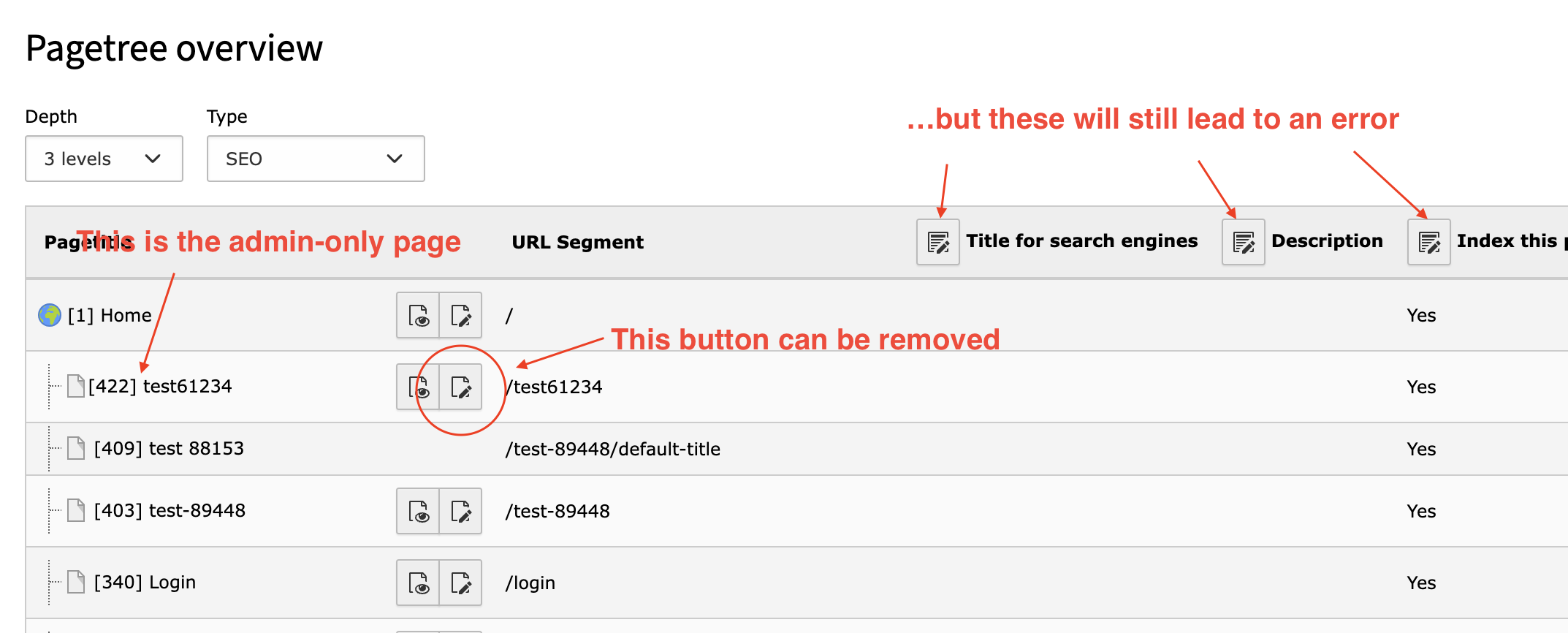
Results on “Info > Pagetree Overview”
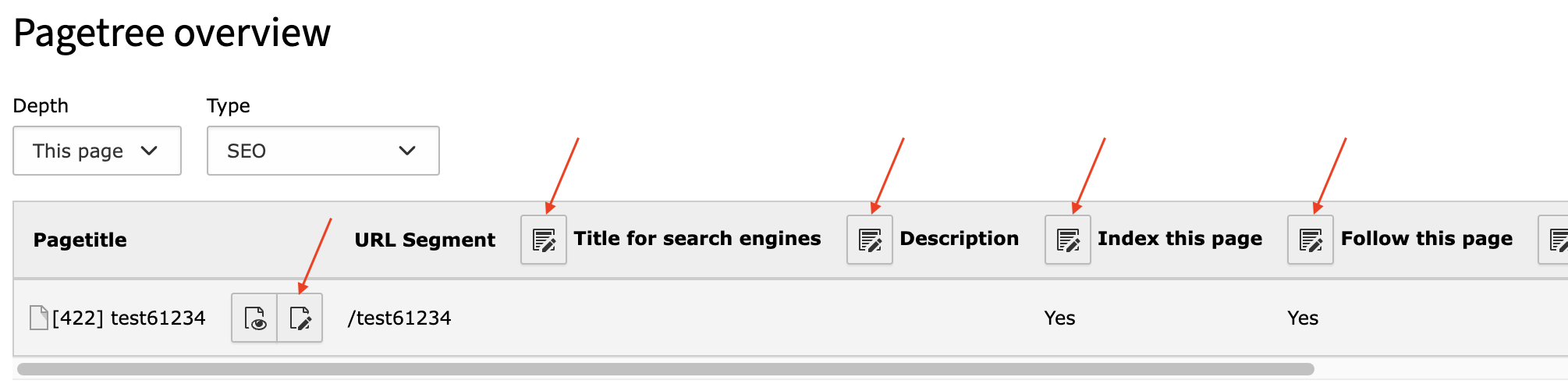
The button to edit the page is still present, as well as buttons to edit the elements of the page, depending on which sub-module you are (e.g. if you are on “SEO” see Cattura03.png)
clicking the buttons leads to errors like:
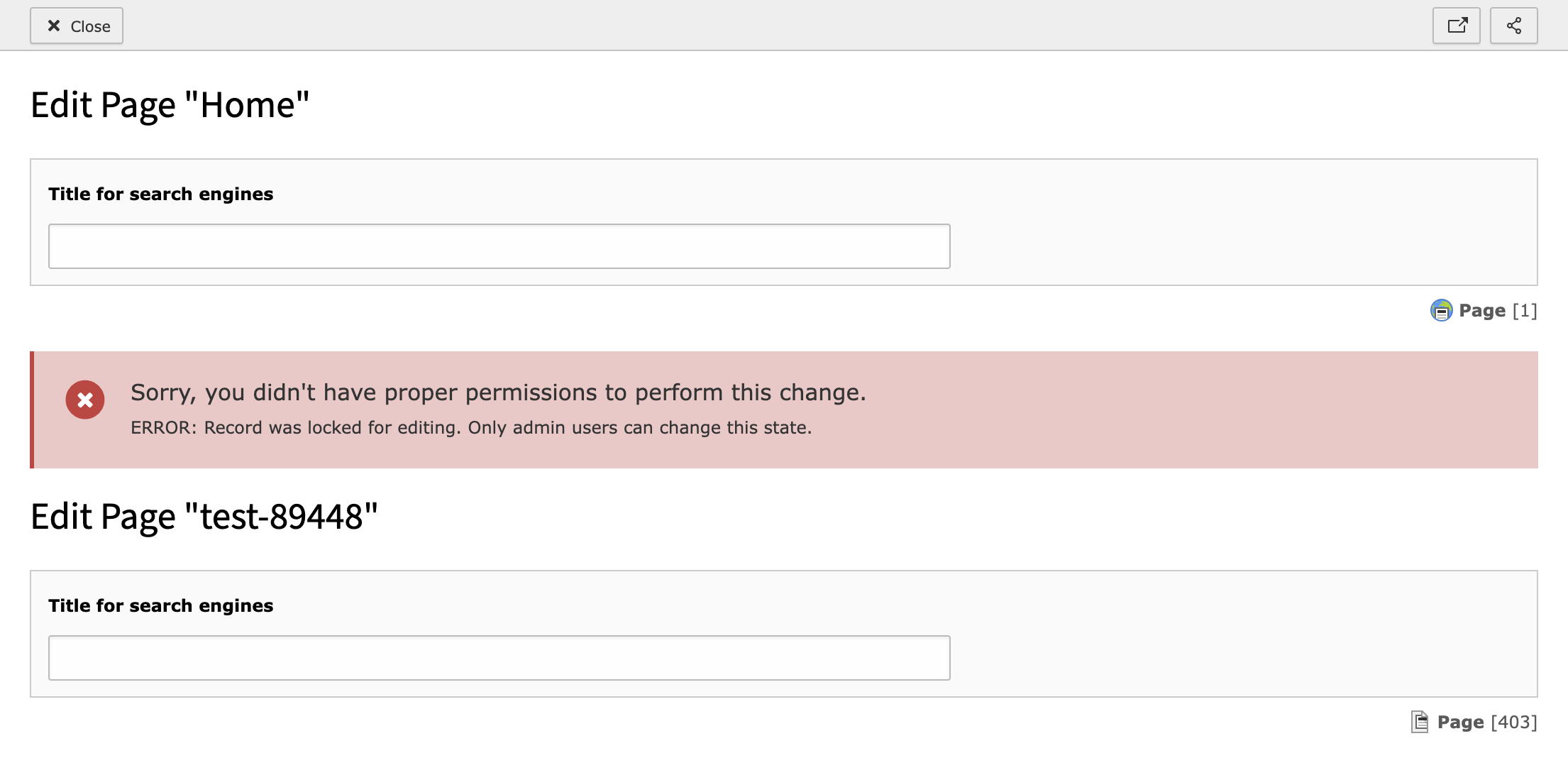
Sorry, you didn't have proper permissions to perform this change.
ERROR: Record was locked for editing. Only admin users can change this state.

Edit form could not be loaded
The edit form could not be loaded for the requested records. This might be due to insufficient permissions.
Here things are more complex: it is possible that the editor cannot edit the page (admin only) but he/she is allowed to edit the sub-pages so… it makes sense to remove the button on the row of the page, but not the other ones.
The situation is summarized on cattura04.png
The only way is that all the other “massive editing” buttons actually skip the “admin-only” pages in this list, to avoid the situation shown on cattura05.png
-
Riccardo De Contardi changed
cattura04.png<span data-processor="relativetime" data-value="2022-04-16T15:46:48+00:00" > 04/16/22, 15:46 </span> -
Riccardo De Contardi changed attached cattura04.png <span data-processor="relativetime" data-value="2022-04-16T15:49:12+00:00" > 04/16/22, 15:49 </span>
-
Riccardo De Contardi commented <span data-processor="relativetime" data-value="2026-05-22T07:49:55+00:00" > 05/22/26, 07:49 </span>
I performed the same test of my previous comment on version 15.0.0-dev (latest main); results are similar:
1. Layout (Page) module
- the icon to edit the whole column is still present, the error message now is:This action could not be completed; please contact your administrator. Technical details: 1: Attempt to modify record tt_content:1028 without permission or non-existing page
The error message is shown for each content element present in the page, albeit I tried to modify just one of those
Suggestion: Still, disable the button on “admin only” pages
2. Records (List) module
- I don’t see anymore any mean to create a new CE3. Status (Info) > Pagetree overview
- same situation as described on my previous comment
Suggestions:
- disable the edit button on the single page when admin-only
- about the “massive edit” buttons, if it is not possible to skip the “admin only” pages, at least make the error message more informative; right now I seeSorry, you didn't have proper permissions to perform this change. ERROR: Record was locked for editing. Only admin users can change this state.
But there is no info about which page failed to be edited…


Hey Georg,
what is the intended behavior?