#94516<textarea> is losing empty lines on the beginning
Albrecht Köhnlein 07/09/21, 09:27 updated 12/02/25, 14:33

Description
I had a case where I had to enter some text starting with multiple empty lines into FormEngine’s textarea element.
When saving and re-opening the first empty line was missing in the editor. I investigated a little bit and found out, that the empty lines still exist when the data is saved to database and still exist in the rendered HTML when generating the form. But there seems to be any JavaScript which removes the first line.
This problem can be reproduced, if you enter some empty lines + a line of text in field tt_content.rowDescription or any other textarea.
When saving and reopening the form, you will see, there is one less empty line in the editor.
Reviews 2

Files 3

History 717
-
Albrecht Köhnlein changed description <span data-processor="relativetime" data-value="2021-07-27T18:46:32+00:00" > 07/27/21, 18:46 </span>
-
Riccardo De Contardi commented and changed attached clipboard-202305131217-sroxg.png attached clipboard-202305131219-ebmoa.png <span data-processor="relativetime" data-value="2023-05-13T10:20:06+00:00" > 05/13/23, 10:20 </span>
This issue is still present on TYPO3 13.0.0-dev
Steps to reproduce it
1. Open a page
2. Edit the field “Notes > Description” ([rowDescription]) with the following:
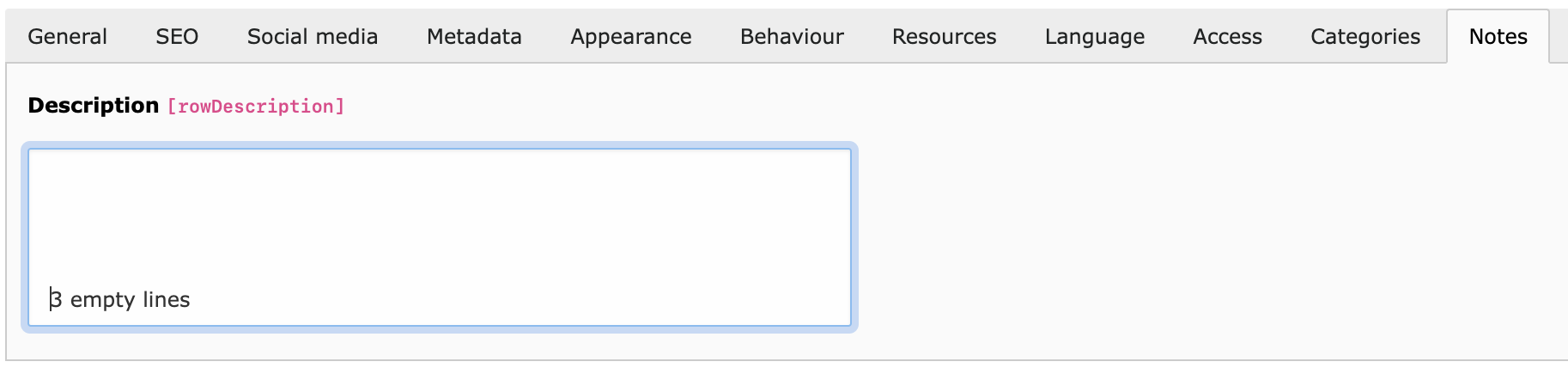
- Leave 3 lines empty (hit 3 times carriage return) and then write something: you should see this:clipboard-202305131217-sroxg.png
3. Save it
Result:
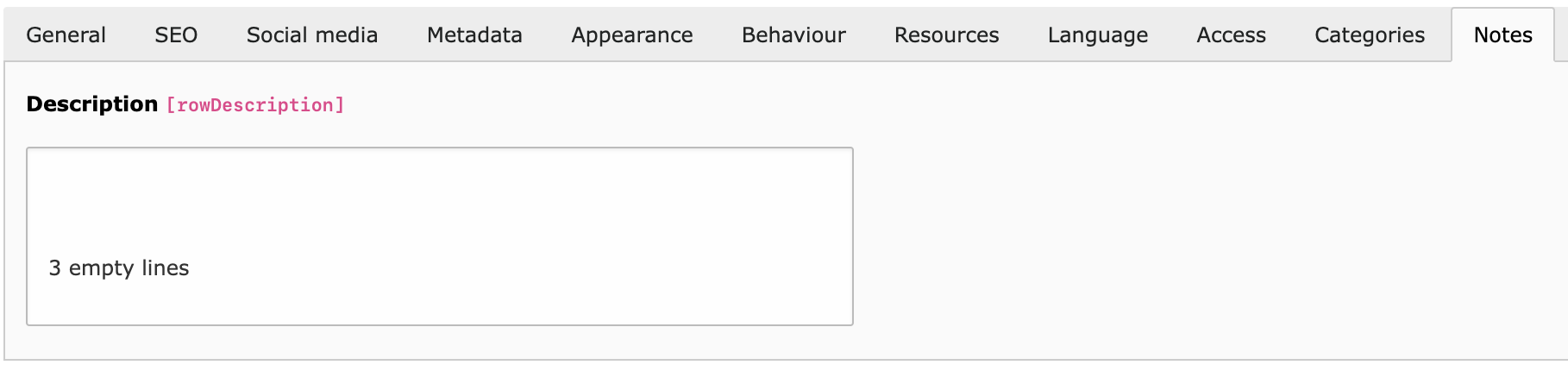
One empty line is cut off:
clipboard-202305131219-ebmoa.png
Expected result
the field content should remain the same
-
Riccardo De Contardi commented <span data-processor="relativetime" data-value="2024-07-05T14:55:36+00:00" > 07/05/24, 14:55 </span>
This issue is still present on 13.3.0-dev (latest main)
-
Gerrit Code Review pushed patch set 1 for main to change 87217 status
NewUnder Review <span data-processor="relativetime" data-value="2024-11-23T19:48:42+00:00" > 11/23/24, 19:48 </span> -
Gerrit Code Review pushed patch set 2 for main to change 87217 <span data-processor="relativetime" data-value="2024-11-23T19:51:43+00:00" > 11/23/24, 19:51 </span>
-
Gerrit Code Review pushed patch set 3 for main to change 87217 <span data-processor="relativetime" data-value="2024-12-11T23:04:45+00:00" > 12/11/24, 23:04 </span>
-
Gerrit Code Review pushed patch set 4 for main to change 87217 <span data-processor="relativetime" data-value="2024-12-18T19:25:12+00:00" > 12/18/24, 19:25 </span>
-
Gerrit Code Review pushed patch set 5 for main to change 87217 <span data-processor="relativetime" data-value="2024-12-19T13:54:37+00:00" > 12/19/24, 13:54 </span>
-
Gerrit Code Review pushed patch set 6 for main to change 87217 <span data-processor="relativetime" data-value="2024-12-19T13:59:04+00:00" > 12/19/24, 13:59 </span>
-
Gerrit Code Review pushed patch set 7 for main to change 87217 <span data-processor="relativetime" data-value="2024-12-21T20:28:15+00:00" > 12/21/24, 20:28 </span>
-
Gerrit Code Review pushed patch set 8 for main to change 87217 <span data-processor="relativetime" data-value="2025-01-06T11:49:12+00:00" > 01/06/25, 11:49 </span>
-
Gerrit Code Review pushed patch set 9 for main to change 87217 <span data-processor="relativetime" data-value="2025-01-06T12:29:33+00:00" > 01/06/25, 12:29 </span>
-
Gerrit Code Review pushed patch set 1 for 13.4 to change 87650 <span data-processor="relativetime" data-value="2025-01-07T08:13:14+00:00" > 01/07/25, 08:13 </span>
-
Albrecht Köhnlein commented and changed status
Under ReviewResolved done0 %100 % <span data-processor="relativetime" data-value="2025-01-07T08:35:08+00:00" > 01/07/25, 08:35 </span>Applied in changeset commit:57b5c6b44449c612e5d3af091d53bdb4d833cd1f.
-
Benni Mack changed status
ResolvedClosed <span data-processor="relativetime" data-value="2025-12-02T14:33:53+00:00" > 12/02/25, 14:33 </span> -
Benni Mack changed Duplicated by #82705 <span data-processor="relativetime" data-value="2026-11-06T11:16:12+00:00" > 11/06/26, 11:16 </span>


Pretty interesting bug. I observed the same bug in the PHP project “adminer” while trying to reproduce the problem. Actually, data gets written correct into the database and all new lines are preserved. When the saved data is used in a HTML
textareatag, it seems to be important to actually render the textarea with the data as following (simplified):It seems important to add a linefeed after the opening
textareatag.The FormEngine Element
TextElementactually renders the textarea as shown below:This leads to the described behavior when saving the record. I changed this locally as shown in the first example and then all new lines are shown correctly.