#97246System Cache can't be cleared, when TCA is wrong (Without any info)
Lukas Dörr 03/28/22, 10:47 updated 10/01/22, 14:16

Description
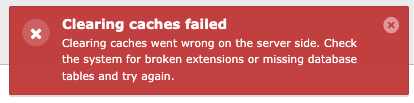
In my case i have installed “Container” Extension from B13, i misconfigured the TCA and before i found that error, i tried to Clear System Cache in Maintenance Tab. In V10 i get an error message, that caches can’t be cleared. After checking TCA Configuration, it tells me, that there is an error.
In V11.5.8 it won’t show anything, not even that red popup on the top right.
Im not sure if this is a extension-based or typo3-based error.
You can reproduce this error by installing container in a clean TYPO3 v11.5.8 installation and writing something wrong in your container element TCA. It won’t tell you anything. Same thing on V10 – but there will be an error message, that system cache can’t be cleared.
Reviews 0
No change resolves or names this issue in its commit message, and no comment links one.
Files 1
History 4
-
Oliver Bartsch commented and changed status
NewNeeds Feedback 03/28/22, 13:13 -
Lukas Dörr commented 03/28/22, 13:34
Oliver Bartsch wrote in #note-1:
> Hi, thanks for creating an issue.
>
> > You can reproduce this error by installing container in a clean TYPO3 v11.5.8 installation and writing something wrong in your container element TCA.
>
> Could you please share the “wrong” container element TCA, so it’s possible to reproduce your specific use case and to determine if the error is in TYPO3 or the extension.Hi Oliver, i just added this code without starting <?php:
\TYPO3\CMS\Core\Utility\GeneralUtility::makeInstance(\B13\Container\Tca\Registry::class)-> configureContainer( ( new \B13\Container\Tca\ContainerConfiguration( '2col-container', '2 Column Container', 'Insert an element dividing the content area into two columns', [ [ ['name' => 'Left Column', 'colPos' => 201], ['name' => 'Right Column', 'colPos' => 202] ] ] ) ) ); -
Oliver Bartsch commented and changed attached flashmessage.png 03/28/22, 16:06
Hi, I unfortunately still don’t fully understand the issue.
The “Clear All Caches” card in the install tool displays the following flash message in case something went wrong:
The flash message is displayed for me in both versions (v10 and v11), as soon as something is misconfigured and caches can not be cleared. Is this message not displayed for you in v11?
If so, could you please have a look into your browser console, whether a JavaScript error is logged? Additionally, you could also check the XHR request (
GET /install.php?install[controller]=maintenance&install[context]=backend&install[action]=cacheClearAll) which can usually be accessed – depending on your browser – in the “Network” tab of the browser console.> After checking TCA Configuration, it tells me, that there is an error.
Where exactly do you check your TCA and in which file did you place the TCA?
-
Riccardo De Contardi commented and changed status
Needs FeedbackClosed 10/01/22, 14:16No feedback since 6 months => closing this issue.
If you think that this is the wrong decision or experience the issue again and have more information about how to reproduce your problem, please reopen it or open a new issue with a reference to this one.
Thank you and best regards


Hi, thanks for creating an issue.
> You can reproduce this error by installing container in a clean TYPO3 v11.5.8 installation and writing something wrong in your container element TCA.
Could you please share the “wrong” container element TCA, so it’s possible to reproduce your specific use case and to determine if the error is in TYPO3 or the extension.