#99355PHP symlink realpath cache issues
Ralph Brugger 12/13/22, 11:51 updated 06/10/24, 20:01

Description
After upgrading from TYPO3 11.5.19 to TYPO3 11.5.20
Expected to find class "TYPO3\CMS\Core\Configuration\Loader\Exception\YamlPlaceholderException" in file "typo3_src-11.5.20/typo3/sysext/core/Classes/Configuration/Loader/Exception/YamlPlaceholderException.php" while importing services from resource "../Classes/*", but it was not found! Check the namespace prefix used with the resource.
Reviews 0
No change resolves or names this issue in its commit message, and no comment links one.
Files 1
History 11
-
Ralph Brugger commented 12/13/22, 12:05
-
Oliver Hader commented and changed status
NewNeeds Feedback 12/13/22, 12:13How did you upgrade? Are you using composer?
-
Ralph Brugger commented 12/13/22, 12:18
No composer.
The classic way:
- get the sources
- symlink the new sources
- typo3/install.php
- Flush Caches && Dump Autoload
Flush Caches failed
We’ve had to manually:
typo3temp]$ rm -rf var/cache/
-
Benjamin Franzke commented 12/13/22, 15:59
I kinda think that this is related to PHP symlink realpath cache issues.
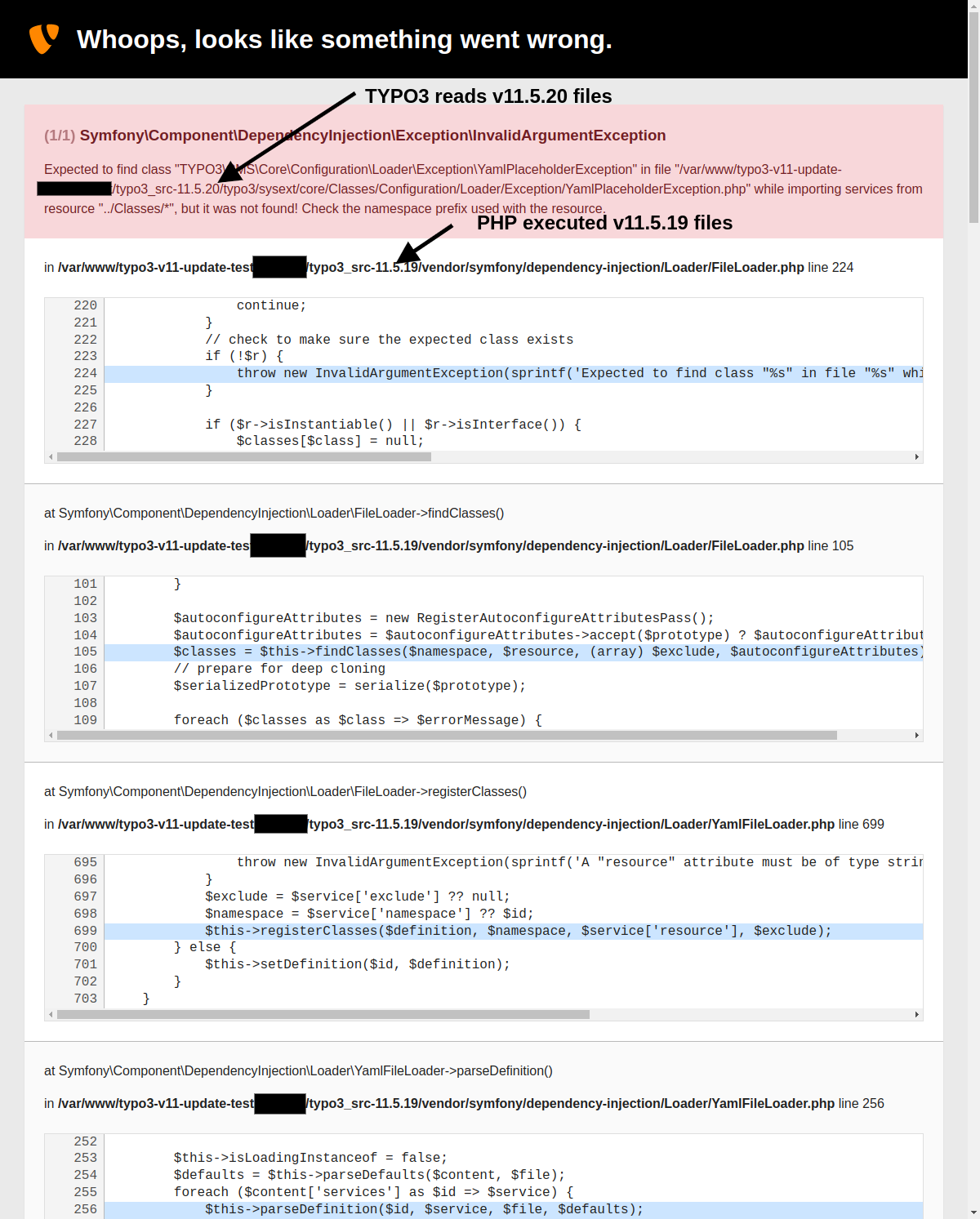
I those cases it happens that v11.5.19 code may run by the php interpreter (because the typo3_src symlink is realpath cached to v11.5.19), while the (document-root based) TYPO3 path calculations already use v11.5.20 directories (because the symlink resolution is not using the realpath cache).In that case the symfony dependency injection directly lookup found that class in the v11.5.20 folder, but php was running from the v11.5.19 folder and thus the mentioned class does not exist.
I myself saw this happen for example on domainfactory servers.So I’d like to know in which server configuration did this happen?
Is it Apache or Nginx?
Apache with mod_php or php-fpm?
Some public (shared) webhosting (where we could possibly reproduce this) or a custom server setup? -
Ralph Brugger commented 12/13/22, 16:06
So I’d like to know in which server configuration did this happen?
Is it Apache or Nginx?
=> Apache/2.4.38 (Debian)Apache with mod_php or php-fpm?
=> php8.1-typo3-11-fpmSome public (shared) webhosting (where we could possibly reproduce this) or a custom server setup?
=> it’s a server setup. custom develop server behind auth login. -
Benjamin Franzke commented and changed status
Needs FeedbackAccepted priorityShould haveCould have 12/14/22, 08:10Thanks.
Did some expirements, and they verified my assumption from #4, its a php-executable problem:
- apache with mod_php + opcache: not affected. Update from v11.5.19 to v11.5.20 works immediately
- apache + php-fpm + without opcache: not affected. Update from v11.5.19 to v11.5.20 works immediately
- apache + php-fpm + opcache: affected. Update from v11.5.19 to v11.5.20: stays at v11.5.19 like forever (due to opcache). It errors once caches are cleared, because then TYPO3 sees v11.5.20 files, while php-fpm still executes v11.5.19 code.
So after all it’s the php opcache that doesn’t reevulate changing symlinks.
For nginx users this is often avoided using $realpath_root for SCRIPT_FILENAME, but that would even help here, but it still brings us to the solution. The configuration needs to teach php-fpm to always evaluate symlink paths.So you have the following options when using apache in order to avoid this:
- Set
opcache.revalidate_path=1in the php.ini of the php-fpm environment (e.g. /etc/php/8.1/fpm/php.ini) – just found about this golden option right now, credits go to https://stackoverflow.com/a/52869752 - Call
sudo systemctl reload php8.1-fpm.serviceafter updating the symlink, in order for the php executable to clear opcache caches - Avoid symlinks, and rather make typo3_src a directory
- (or use mod_php instead of php-fpm, but there a probably good reasons why you are using php-fpm and I’d stick to the first mentioned option)
I verified all of the above to avoid such errors after switching symlinks.
There is no codewise fix as long as we support symlink-baded installations, as it’s about server configuration. We could/should add a note to the documentation somewhere.
-
Benjamin Franzke commented and changed attached typo3-v11-update-symlink-switch-trace.png 12/14/22, 08:25
BTW, a full backtrace would have helped to make this clear from the very beginning.
The following screenshot demonstrates the different paths being used (v11.5.20 by TYPO3 vs stale v11.5.19 by PHP-FPM): -
Ralph Brugger commented 12/14/22, 08:35
Thanks a lot!
We’lle be trying the opcache.revalidate_path=1 option in the PHP.INI!
BTW, a full backtrace would have helped to make this clear from the very beginning.
Yes & sorry, I just didn’t see that.
-
Oliver Hader changed category 12/14/22, 13:12
-
Oliver Hader changed subject
YamlPlaceholderExceptionPHP symlink realpath cache issues 12/14/22, 13:12 -
Georg Ringer commented and changed status
AcceptedClosed 06/10/24, 20:01closing issue as no feedback given anymore – guessing that it is resolved. also haven’t seen any issues like that in that area.
if still relevant for you, please open a new issue and reference this one or contact me on slack


Install-Tool, Flush TYPO3 and PHP Cache && Rebuild PHP Autoload Information did not work.
Manually
typo3temp]$ rm -rf var/cache/
helped