#99479Flexform container toggle all button does not render content preview of collapsed items
Philipp Hanebrink 01/06/23, 14:58 updated 03/24/25, 20:32

Description
*Description:*
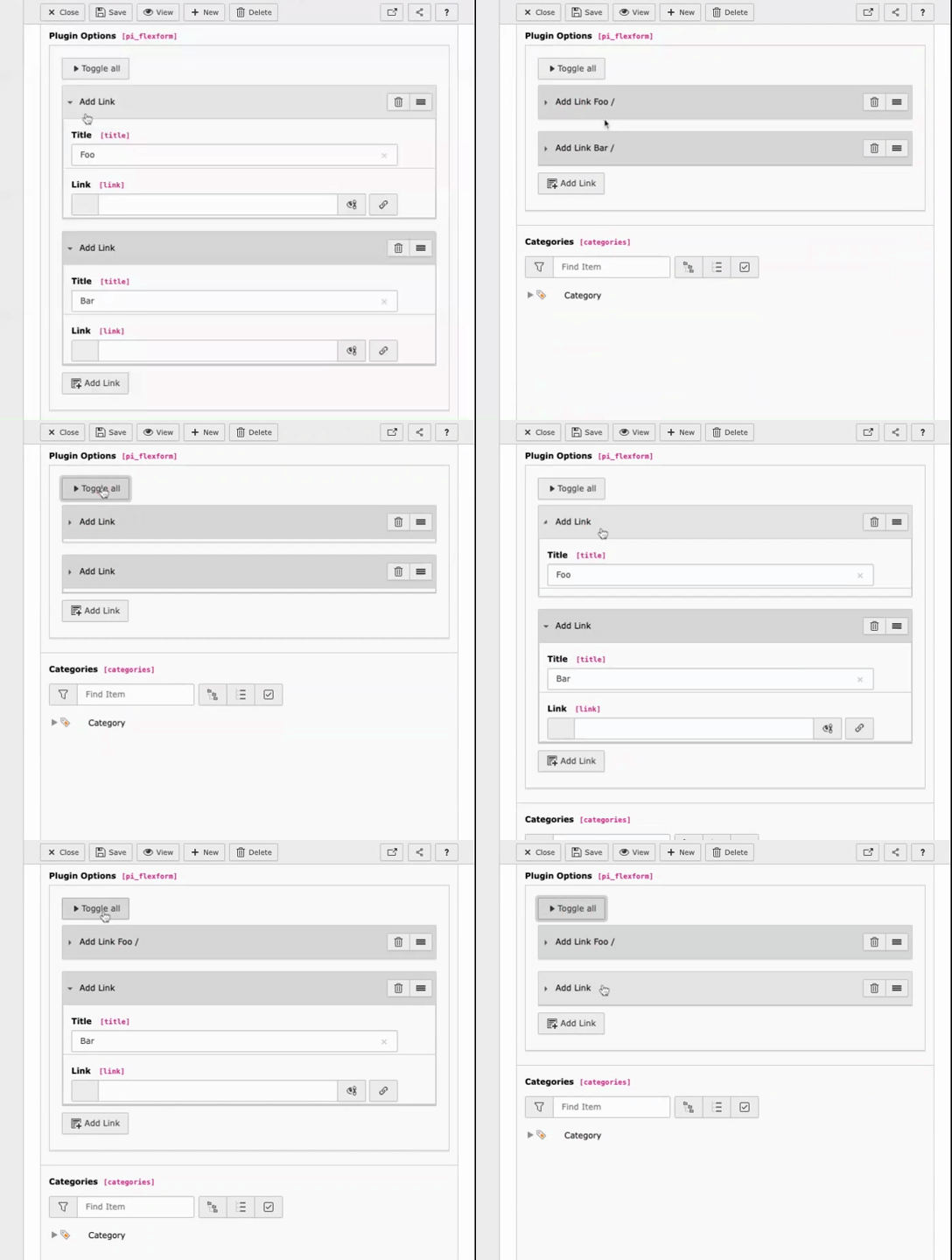
If I collapse a single item in a flexform container the fields are used as preview for the collapsed item. If I collapse items with the ‘Toggle all’ button, the preview is not rendered. It seems like the ‘Toggle all’ button only collapses and expands the items without the preview-logic of the single item collapse feature.
*What I would Expect:*
I would expect the content preview to be rendered if the items are collapsed with the ‘Toggle all’ button.
*Example (animated gif):*
flexform-preview.gif
Code Snippet of Flexform:
<?xml version="1.0" encoding="utf-8"?>
<T3DataStructure>
    <meta>
        <langDisable>1</langDisable>
    </meta>
    <ROOT>
        <type>array</type>
        <el>

            <linklist>
                <section>1</section>
                <type>array</type>
                <el>
                    <container>
                        <title>Add Link</title>
                        <type>array</type>
                        <el>
                            <title>
                                <TCEforms>
                                    <label>Title</label>
                                    <config>
                                        <type>input</type>
                                        <eval>trim</eval>
                                    </config>
                                </TCEforms>
                            </title>
                            <link>
                                <TCEforms>
                                    <label>Link</label>
                                    <config>
                                        <type>input</type>
                                        <renderType>inputLink</renderType>
                                        <fieldControl>
                                            <linkPopup>
                                                <options>
                                                    <blindLinkFields>class,params,title</blindLinkFields>
                                                    <blindLinkOptions>folder</blindLinkOptions>
                                                </options>
                                            </linkPopup>
                                        </fieldControl>
                                    </config>
                                </TCEforms>
                            </link>
                        </el>
                    </container>
                </el>
            </linklist>
        </el>
    </ROOT>
</T3DataStructure>
Reviews 0
No change resolves or names this issue in its commit message, and no comment links one.
Files 2
History 2
-
Philipp Hanebrink changed description 01/06/23, 14:58
-
Georg Ringer commented and changed attached Edit-Form-engine---flex-1-on-page-flex-·-Master-12-TYPO3-CMS-14-0-0-dev-.mp4 status
NewClosed 03/24/25, 20:32

can’t reproduce that on v14 anymore, closing.