#104252Subpages of mountpoint generate 404's in all languages but languageId 0
Albert van der Veen 06/28/24, 16:27 updated 08/11/26, 08:46

Description
When creating a mountpoint in a site with two languages, Dutch (languageId 0) and English (languageId 1), the mountpoint and it’s subpages are available in the frontend for languageId 0. However, for languageId 1, only the toplevel page is available. Every subpage generates 404’s, although the urls look ok.
So, these work: /2023-2024/algemeen/ /2023-2024/algemeen/inleiding/ etc…
This one also: /en/2023-2024/general/
But this one, and all others, not: /en/2023-2024/general/introduction/
Reviews 3
- 13.4 94867[BUGFIX] Resolve subpages of translated mount points Resolves this issue Merged Stefan Bürk CR +2 V +2 → main, 14.3 Easy +31 −1
- 14.3 94866[BUGFIX] Resolve subpages of translated mount points Resolves this issue Merged Stefan Bürk CR +2 V +2 → main, 13.4 Easy +31 −1
- main 94831[BUGFIX] Resolve subpages of translated mount points Resolves this issue Merged André Buchmann CR +2 V +2 → 14.3, 13.4 Easy +31 −1


Files 5

History 1619
-
Garvin Hicking commented and changed status
NewNeeds Feedback <span data-processor="relativetime" data-value="2024-06-28T16:38:18+00:00" > 06/28/24, 16:38 </span> -
Albert van der Veen commented <span data-processor="relativetime" data-value="2024-07-07T16:24:10+00:00" > 07/07/24, 16:24 </span>
You will probably get the same error if you create a mountpoint in a multi language site of your own: I tried it in several different sites, all with different site config and Typoscript. Or would you like to have a backend login to one of my sites, so you can check the site config and Typoscript being used?
-
Garvin Hicking commented <span data-processor="relativetime" data-value="2024-07-07T17:09:00+00:00" > 07/07/24, 17:09 </span>
Thanks for getting back.
Personally I am not using mointpoints very often,
so to debug it it would be better to have it reproducible in “my” development install.Maybe you could bundle a SQL dump and the involved config/sitepackage as a minimal example? That would make it much quicker for me to look at (and maybe others)
-
Albert van der Veen commented and changed attached theballandi.zip <span data-processor="relativetime" data-value="2024-07-09T16:03:07+00:00" > 07/09/24, 16:03 </span>
No problem, attached you’ll find a zip-file containing a db dump and a home dir. You have to adjust the db-settings in file html/local/config/server-environment.php and the config/sites/site_theballandi/config.yaml and run composer install in the home dir, followed by ./local-deploy.sh, also from the home dir.
The site has no language menu, so you’ll have to check the following url’s directly in a browser:
en/mount/test – will give a 404
mount/test – is ok and gives ‘Test’ -
Garvin Hicking commented <span data-processor="relativetime" data-value="2024-07-09T17:10:21+00:00" > 07/09/24, 17:10 </span>
Great! I’ll have a look the next days and see what I can find out!
-
Garvin Hicking commented <span data-processor="relativetime" data-value="2024-07-18T07:31:34+00:00" > 07/18/24, 07:31 </span>
(I haven’t forgotten this, but due to project work couldn’t get to it yet. Bear with me :)
-
Garvin Hicking commented <span data-processor="relativetime" data-value="2024-07-24T08:52:24+00:00" > 07/24/24, 08:52 </span>
Was able to spin the dev instance up, however the SQL dump is missing data for “pages” and “tt_content” and thus no active mounts – could you maybe also give some dummy data for that for me to further reproduce it? Sorry for the hassle :)
-
Garvin Hicking commented <span data-processor="relativetime" data-value="2024-08-06T18:15:20+00:00" > 08/06/24, 18:15 </span>
Ping – do you maybe have that pages&tt-content dump for the relevant content?
-
Albert van der Veen commented and changed attached home.zip attached ahk.sql.zip attached Schermafbeelding 2024-08-20 om 17.35.08.png <span data-processor="relativetime" data-value="2024-08-20T15:38:46+00:00" > 08/20/24, 15:38 </span>
Hi Garving, sorry for the delay, have been away. Here are a new zip of a site structure and sql dump. You can try whether the sql dump works with the site you already have, but probably better to start with the new structure, as it’s a different site.
If you go to en/home, the second link to ‘feedback’, which is a mountpoint, will give a ‘page not found’.
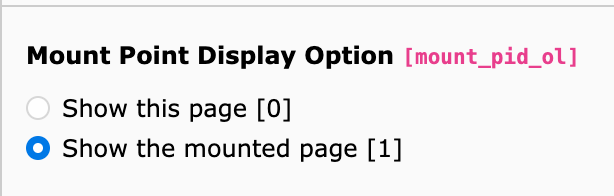
If you go to home, the second link to ‘feedback’ will give ‘feedback’.The problem seems to be which option you choose in the mountpoint settings of the page – see screenshot. If you choose ‘Show the mounted page’, the EN page gives a 404.
-
Astrid Haubold commented <span data-processor="relativetime" data-value="2025-04-22T13:41:47+00:00" > 04/22/25, 13:41 </span>
I came across this issue recently in TYPO3 11.
I could narrow it down to line 390 of TYPO3\CMS\Core\Routing\PageSlugCandidateProvider:$pageWhichMustBeInRootLine = (int)($mountPointPage['mount_pid_ol'] ? $mountedPage['uid'] : $mountPointPage['uid']);
- $pageWhichMustBeInRootLine is later compared to rootline
- rootline uids are in default language
- in any other than default language $pageWhichMustBeInRootLine is the uid of the translated page
If $pageWhichMustBeInRootLine is always set to the default language page uid that should solve the problem:
//must be uid of page in default language
 $mountPointPageIdInLanguage = (int)($languageId > 0 ? $mountPointPage['l10n_parent'] : ($mountPointPage['t3ver_oid'] ?: $mountPointPage['uid']));
// Depending on the "mount_pid_ol" parameter, the mountedPage or the mounted page is in the rootline
$pageWhichMustBeInRootLine = (int)($mountPointPage['mount_pid_ol'] ? $mountedPage['uid'] : $mountPointPageIdInLanguage);
-
Bastian Holzem commented <span data-processor="relativetime" data-value="2025-07-28T13:08:11+00:00" > 07/28/25, 13:08 </span>
Astrid Haubold wrote in #note-10:
> I came across this issue recently in TYPO3 11.
> I could narrow it down to line 390 of TYPO3\CMS\Core\Routing\PageSlugCandidateProvider:
>
> […]
>
> * $pageWhichMustBeInRootLine is later compared to rootline
> * rootline uids are in default language
> * in any other than default language $pageWhichMustBeInRootLine is the uid of the translated page
>
>
>
> If $pageWhichMustBeInRootLine is always set to the default language page uid that should solve the problem:
>
> […]i have the same problem on a TYPO3 12.4.34 Installation
are there any plans implement the fix provided by Astrid Haubold?The fix still working in TYPO3 12.4.34
-
Garvin Hicking commented <span data-processor="relativetime" data-value="2025-07-28T14:09:54+00:00" > 07/28/25, 14:09 </span>
Maybe someone can contribute this as a patch so that also tests can be run against it and review/voting can happen? Much appreciated! :)
-
Bastian Holzem commented <span data-processor="relativetime" data-value="2025-12-05T08:05:53+00:00" > 12/05/25, 08:05 </span>
Is there any information yet regarding an official fix in one of the next TYPO3 versions?
-
Gerrit Code Review pushed patch set 1 for main to change 94831 status
Needs FeedbackUnder Review <span data-processor="relativetime" data-value="2026-07-18T07:27:53+00:00" > 07/18/26, 07:27 </span> -
André Buchmann commented and changed attached clipboard-202607180942-nwdy6.png <span data-processor="relativetime" data-value="2026-07-18T07:47:24+00:00" > 07/18/26, 07:47 </span>
Heyho together,
based on the findings by @astridhaubold I’ve created a patch and extended the existing tests.
I reproduced this error in 13.4.33 and dev-main (v15). It only occures if the mountpoint page itself is translated and uses
mount_pid_ol=0. On trying to open a mounted page in a translation we only get a 404.Easy to reproduce with a basic TYPO3 14/15 installation with Camino preset:
- Remove PageTS restriction in camino theme to allow mount points by removing
7fromdoktype.removeItems = 7,199https://github.com/typo3/typo3/blob/main/typo3/sysext/theme_camino/Configuration/Sets/camino/page.tsconfig#L16-L16 - Create a mountpoint page below the root page and point it e.g. to the sysfolder “Footer”. Make sure to have
mount_pid_ol=0set. - Translate the mountpoint page and the pages in the sysfolder to e.g. german.
- Open the mounted page translation in frontend -> 200
- Append the translated slug of the Imprint-page to the url / use language switcher -> 404
- Apply patch and try the same url again -> 200
In my example the urls are like this:
Default Lang: https://typo3-cms-15.ddev.site/camino/my-mount/imprint
Translation: https://typo3-cms-15.ddev.site/camino/de/my-mount/imprint.clipboard-202607180942-nwdy6.png
@ghi Hope we can merge this bugfix for 13.4 also as this is a long standing bug and the Code in the PageSlugCandidateProvider barely changed. :-)
- Remove PageTS restriction in camino theme to allow mount points by removing
-
Gerrit Code Review pushed patch set 1 for 14.3 to change 94866 <span data-processor="relativetime" data-value="2026-07-21T16:32:26+00:00" > 07/21/26, 16:32 </span>
-
Gerrit Code Review pushed patch set 1 for 13.4 to change 94867 <span data-processor="relativetime" data-value="2026-07-21T16:32:52+00:00" > 07/21/26, 16:32 </span>
-
André Buchmann commented and changed status
Under ReviewResolved done0 %100 % <span data-processor="relativetime" data-value="2026-07-21T16:55:09+00:00" > 07/21/26, 16:55 </span>Applied in changeset commit:1fe51c1a66864929a149a4400b20f44f073a3407.
-
Benni Mack changed status
ResolvedClosed <span data-processor="relativetime" data-value="2026-08-11T08:46:38+00:00" > 08/11/26, 08:46 </span>


This might be a specific site config configuration issue, or from your base typoscript.
Can you try to setup up a minimal example to reproduce this with a site config plus base typoscript and put that here? Then we can try to help.