#90446Backend User Listing: adding/removing users to compare faulty
Michael Schams 02/20/20, 06:33 updated 02/27/20, 12:43

Description
In the Backend User Listing.
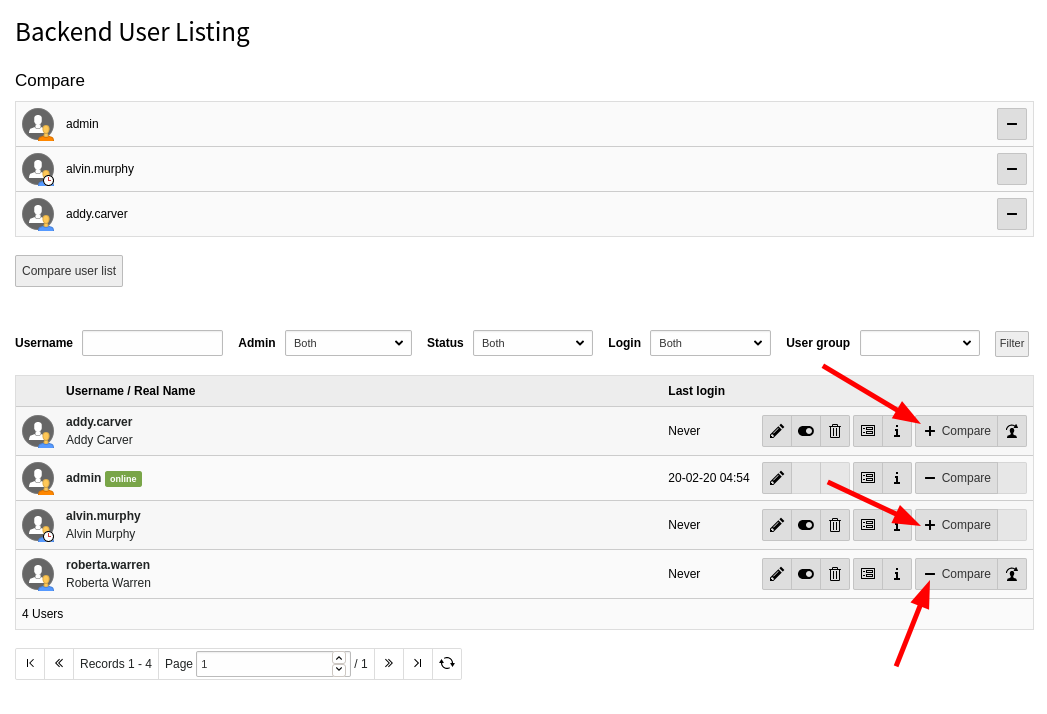
When adding/removing users to the compare selection, the UI reacts weird.
See attached screenshot.
I have assumed, when I add a user to the list, the “compare” button changes from a plus to a minus sign so that I can remove this user from the compare list by clicking either the minus button at the top, or by clicking the “compare” button again.
I added three users to the compare list but the “compare” buttons in the list view are inconsistent:
- “Addy” is in the compare list, but her button shows a plus (clicking it does not change the list).
- “admin” is in the compare list and the button is correct (and I can remove this user again).
- “Alvin” has the same issue as “Addy” (his button should show a minus as he’s in the list).
- “Roberta” is NOT in the list, but her button shows a minus (clicking it does not change the list).
…or maybe I misunderstand the UI concept behind this page? :-)
TYPO3 version: 10.3-dev