#92695Search modal dialog cannot be used with a keyboard
Gabe Troyan 10/23/20, 17:45 updated 05/25/24, 17:26

Description
Pages/Tasks
- Search
Affected WCAG 2.1 Success criterions
- 1.3.1 Info and Relationships A
- 2.1.1 Keyboard A
- 2.4.4 Link Purpose (In Context) A
- 4.1.2 Name, Role, Value A
Affected components
- Dialog
Description
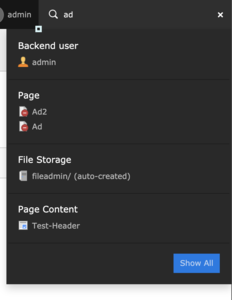
When you type text in the search input field, a modal dialog with the search results opens. This dialog with all including search results cannot be reached with the keyboard. As soon as the input field loses focus, the dialog gets closed.
The modal dialog also has an invalid ARIA role=“menu”, which would require to have additonal child nodes with other ARIA roles like role=“menuitem”:
<div class="dropdown-menu" role="menu">
  ...
</div>
The ARIA role=“menu” is wrong in this context, as the modal dialog doesn’t contain a menu.
Before the search model dialog there is an empty link, which seems to control the visibility of the dialog:
<a href="#" class="dropdown-toggle t3js-toolbar-search-dropdowntoggle" data-toggle="dropdown" aria-expanded="false"></a>Empty links should be avoided.
Recommendation
Make the search modal dialog available for keyboard usage and use the best practice design pattern for modal dialogs for the search dialog.
Remove the empty link or at least make it invisible for screenreader users, for example with aria-hidden=“true”.
Further Information
https://www.w3.org/TR/wai-aria-practices-1.1/examples/dialog-modal/dialog.html
Reviews 0
No change resolves or names this issue in its commit message, and no comment links one.

