#96744Unsupported file typ xxx.dwg (image/vnd.dwg)
Martin Weymayer 02/04/22, 11:44 updated 11/27/23, 17:23

Description
If you upload some “image” files to folder in fileadmin which are not listet in ImageMagickFile.php -> protected $allowedExtensions following error occures:
Unsupported file typ xxx.dwg (image/vnd.dwg)
This happens since introducing MimeTypeCollection.php where ‘image/vnd.dwg’ => [‘dwg’], is added like other file types and TYPO3 ist now trying to send file through ImageMagick which can not handle the file type.
By manually (quick and dirty) adding protected $allowedExtensions = [‘png’, ‘jpg’, ‘jpeg’, ‘gif’, ‘webp’, ‘tif’, ‘tiff’, ‘bmp’, ‘pcx’, ‘tga’, ‘ico’, ‘dwg’]; to line 87 in ImageMagickFile.php I could solve the problem – but next update all get lost.
Reviews 0
No change resolves or names this issue in its commit message, and no comment links one.
Related issues 1

Files 1
History 12
-
Bastian Bringenberg commented and changed project id TYPO3 Version 11 02/04/22, 12:26
-
Oliver Hader commented and changed status
NewNeeds Feedback 02/05/22, 11:10Which behavior would you expect?
a) just not showing the error message
b) rendering a proper preview of thatdwgfile as wellIt seems, that
dwgis not supported by ImageMagick (convert -list format).
In case my observation is correct, adding the mime-type toImageMagickFilewould just be a work-around, since that type cannot be processed by ImageMagic.I’d suggest to avoid processing those files, in case they cannot be processed by ImageMagick at all. The file abstraction layer just considers any mime-type starting with
image/as image – however does not know about types that can be handled with ImageMagick – the (wrong) assumption is “ImageMagick can process all image formats”:So, either there could be an exclude list to deny
image/vnd.dwg(and other unsupported formats), or the capabilities and supported file formats of ImageMagick are auto-discovered by TYPO3.A quick solution would be trigger preview rendering only, if the file extensions is configured accordingly in
$GLOBALS['TYPO3_CONF_VARS']['GFX']['imagefile_ext']. Thus, prefer usingAbstractFile::isImage()instead ofAbstractFile::getType() === AbstractFile::FILETYPE_IMAGElike currently in the example below. -
Martin Weymayer commented 02/05/22, 11:19
It would be fine to add custom file extensions to a list in installtool like [GFX][imagefile_ext]
-
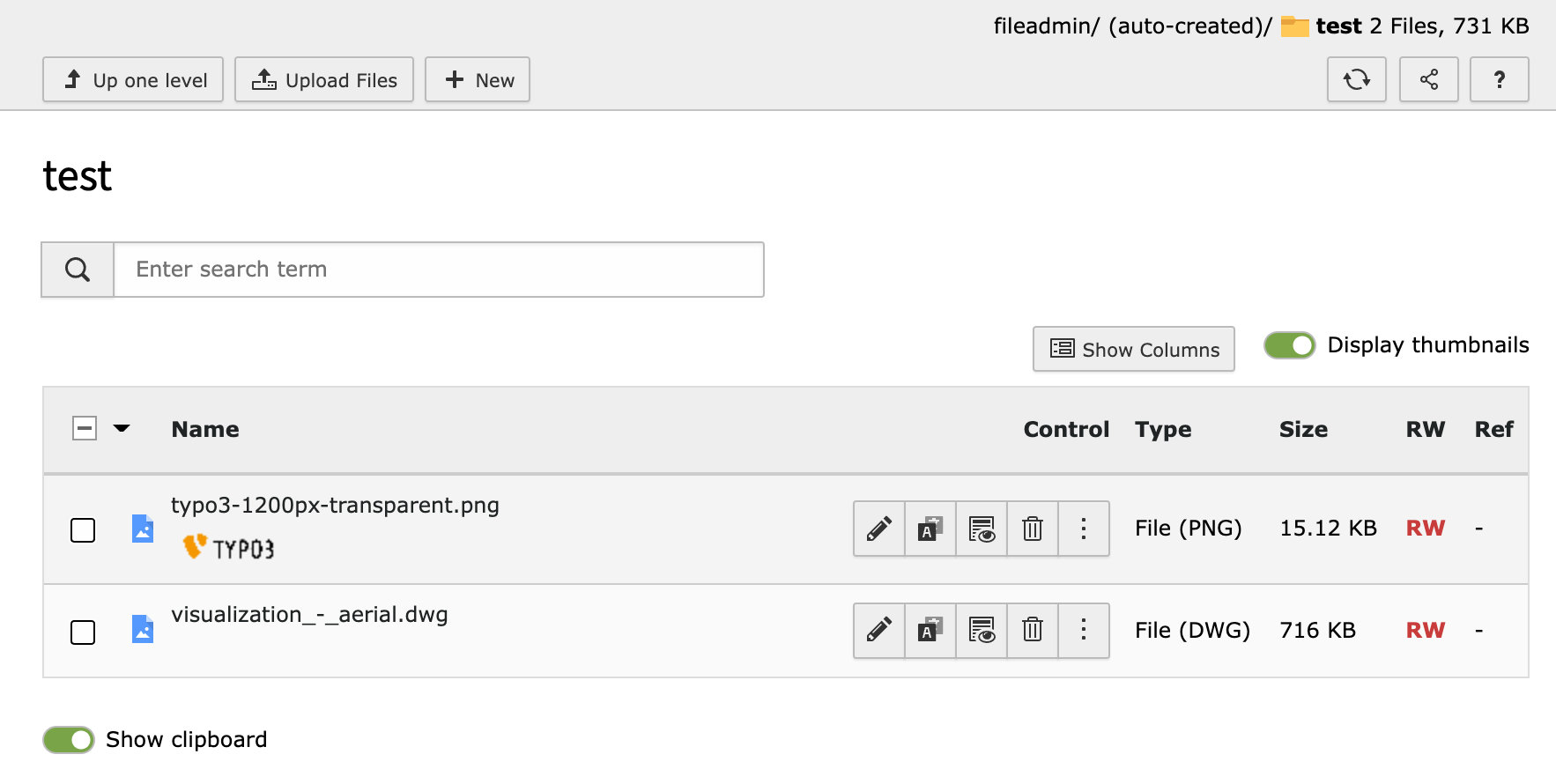
Oliver Hader commented and changed attached 96744_test.png 02/05/22, 11:52
I was not able to reproduce this in the
fileadmin/file-list module (see screenshot below).
Can you please describe how you produced this in your environment? Thanks in advance!(the test DWG file has been taken from https://knowledge.autodesk.com/support/autocad/downloads/caas/downloads/content/autocad-sample-files.html)
-
Martin Weymayer commented 02/05/22, 11:57
I uploades dgw file via ftp to folger “dwg-files” and then I clicked in backend on “filelist -> dwg-files“
maybe not all imagemagick versions support dwg files – but there are for shure other image-file-extensions which imagemagick can not handle and error will occure -
Oliver Hader commented 02/05/22, 12:32
What’s the exact TYPO3 version that is being used here? I could not reproduce with TYPO3 v11.5.6-dev, but just realized that version assignment in this ticket was probably wrong…
-
Martin Weymayer commented 02/05/22, 12:34
11.5.5 – same problem in version 9.5x
-
Oliver Hader commented 02/05/22, 12:47
Thumbnails in the file-list view are rendered by this conditional branch:
https://github.com/TYPO3/typo3/blob/e8120972ffc3ef623f589dd5eaf1d5fee757b1f1/typo3/sysext/filelist/Classes/FileList.php#L692Thus, either
dwgis configured in$GLOBALS['TYPO3_CONF_VARS']['GFX']['imagefile_ext']
https://github.com/TYPO3/typo3/blob/0b16a723296a63e726343673e74117f35bc3cb3c/typo3/sysext/core/Classes/Resource/AbstractFile.php#L333-L336Or
dwgis configured in$GLOBALS['TYPO3_CONF_VARS']['SYS']['mediafile_ext']
https://github.com/TYPO3/typo3/blob/0b16a723296a63e726343673e74117f35bc3cb3c/typo3/sysext/core/Classes/Resource/AbstractFile.php#L342-L345Removing
dwgfrom eitherimagefile_extormediafile_extshould solve the scenario you described. In case it does not, I’m lost and sorry since I have to give up guessing… -
Oliver Hader commented and changed Tags pending-close 02/08/22, 11:43
I think the problem can be solved with the suggestions of my previous comment.
Thus, I’d like to close this ticket. Please report back, in case something should be changed code-wise. Thanks! -
Oliver Hader commented and changed status
Needs FeedbackClosed 03/22/22, 11:24Closing this ticket. Please reopen or create a new issue in case there are new aspects to this topic. Thanks in advance!
-
Jan Kornblum commented 11/27/23, 17:23
In 9 LTS, none of olivers suggestions did work. I will open a new issue: https://forge.typo3.org/issues/102535
-
Jan Kornblum changed Related to #102535 11/27/23, 17:32


Moved to right project.
Guessed TYPO3 Version.