#99828Misleading note "Slugs updated" with automatic generation of redirects only
Benjamin Robinson 02/04/23, 16:35 updated 11/09/26, 10:16

Description
With the following configuration, redirections are created automatically when slugs are changed manually. Slugs of the subpages are not adjusted automatically.
settings:
  redirects:
    autoUpdateSlugs: false
    autoCreateRedirects: true
    redirectTTL: 0
    httpStatusCode: 301
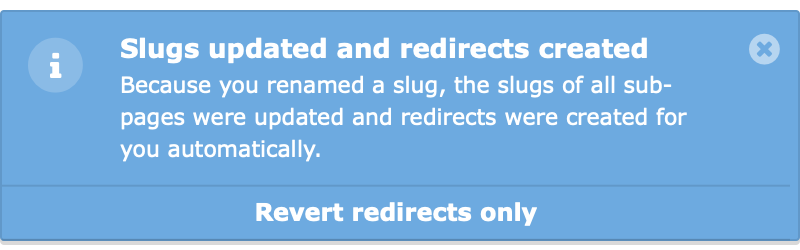
In the message that appears, it is incorrectly stated that slugs of the sub-pages have also been automatically adjusted, which is not the case according to the settings:
> Slugs updated and redirects created
> Because you renamed a slug, the slugs of all sub-pages were updated and redirects were created for you automatically.
> [Revert redirects only]
Reviews 0
No change resolves or names this issue in its commit message, and no comment links one.
Related issues 1

Files 1
History 3
-
Benni Mack commented and changed status
NewClosed <span data-processor="relativetime" data-value="2026-11-09T10:16:00+00:00" > 11/09/26, 10:16 </span>Resolved on main and 14.3 by #108375 (fd78d8ec452 / 672d0ceeccd): the slug change notification now names the changed page and only mentions updated sub-pages and created redirects if any were actually updated or created. With autoUpdateSlugs: false and autoCreateRedirects: true it reads e.g. “You changed the slug of “Page” (/old to /new). 1 redirect was created automatically.” and only offers “Revert redirects only”. Closing as resolved.
-
Benni Mack changed Related to #108375 <span data-processor="relativetime" data-value="2026-11-09T10:16:05+00:00" > 11/09/26, 10:16 </span>


Thanks for the report. We had it already on the todo list to rethink the
displayed message, especially for non-technical people. This more static
message not taking into account of the constellation of flags used is not
really helpfull. Technicall, it also do not check if slugs has been realy
changed or redirects added, it’s simply based on the current configured
settings.